Start here
Think in three responsibilities
- Connect business context to data structures
- Stabilize reusable meaning for analytics consumption
- Hand trusted semantic output to SAC, comparisons, and decision workflows
SAP Datasphere matters because analytics trust is usually won or lost before a dashboard is opened. Current SAP learning material frames Datasphere around integrating, modeling, and managing relevant business data, while preserving business context and enabling self-service consumption through analytic models and governed exposure. If business meaning, reusable measures, and semantic ownership are unclear, polished reports only hide the problem. Datasphere belongs in the part of the SAP analytics system where teams shape governed meaning and make it reusable across analytical experiences.
If users see inconsistent numbers, duplicated KPI logic, or endless reconciliation work, the real issue is often semantic design. If the need is better user-facing analysis or planning interaction, the answer may sit in SAC instead.
Use this explanation for mixed audiences: Datasphere is about governed meaning and reusable structure, not just where data happens to sit. Current capabilities center on Spaces as operating boundaries, analytic models for consumption, semantic types for taxonomy consistency, Data Access Controls for governance, and data products in Business Data Cloud for reuse across platforms. Recent releases added seamless planning with SAC and, during 2025, analytic model stacking, object versioning, Spark-based transformation flow improvements in file spaces, and many new replication sources and targets, followed in 2026 by data product governance and AI-assisted SQL generation.
Define business entities, measures, dimensions, and relationships so the same ideas survive across use cases.
Move teams away from rebuilding logic in every story, workbook, or departmental model.
Create a layer where inconsistencies can be controlled before they multiply in consumption surfaces.
Support downstream analytical experiences without forcing the presentation layer to become the semantic layer.
Datasphere only creates value when the benefits of semantic control are visible in real analytical work. Strong semantics mean metrics mean the same thing everywhere, change happens with review, and teams can depend on the numbers without endless reconciliation.
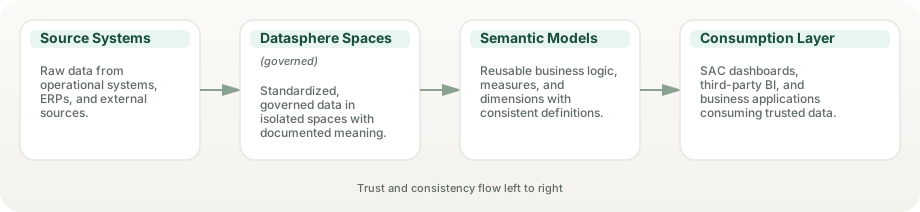
Teams spend less time debating what a measure means in each report. When a KPI is defined once and exposed consistently, people stop arguing about whether the number is right. They can trust it and move on to what it means for business decisions.
Common KPI definitions travel further instead of being rebuilt in parallel. When revenue is calculated once in the semantic layer, every team from sales to finance consumes the same definition, reducing the hidden work of maintaining consistency.
Dashboards and planning models consume more stable business meaning. When SAC stories connect to Datasphere analytic models instead of local calculations, the dashboard itself can stay thinner and change less frequently.
Future-state design becomes easier when semantic ownership is explicit. When you modernize BW logic to Datasphere, you are not just moving data—you are documenting exactly what the data means so the next team can inherit clarity instead of confusion.
Semantic changes can be reviewed, tested, and communicated before they hit dashboards. This prevents the silent metric drift where KPIs change in the background and reports accidentally show different stories.
Datasphere's core value sits in Spaces as operating units, analytic models for governed consumption, semantic types for consistent taxonomy, Data Access Controls for hierarchical governance, and data products in Business Data Cloud for governed reuse beyond a single space. These features work together to make meaning reusable and trust explicit.
Spaces provide secure work areas with their own storage, workload settings, and administrator control. They are not just folders; they are part of the control model that keeps semantic work organized and auditable. Use Spaces to separate business domains or initiative lifecycles.
Latest: 2026 releases added space copy and more file spaces (object store) per tenant; workload priority, storage assignment, and audit settings remain per-space controls.
Expose business meaning through analytic models that SAC consumes live and that other clients, such as Power BI, consume through the OData API. Models combine dimensions, measures, and semantic structure so downstream tools stay thin.
Good use: governed KPI definitions, reusable dimension hierarchies, and self-service discovery without rebuilding logic in every tool.
Define data types and semantic classifications that propagate through the system. Semantic types ensure that the same business concept (like "Customer" or "Revenue") means the same thing in every model.
Strengthens when: data stewards define and curate types, and consumption tools honor the taxonomy in discovery and cataloging.
Govern who sees what data based on role, hierarchy, or attribute. DACs keep security policy out of calculated fields and move it into the semantic layer where it can be audited and tested.
Latest: data access controls can be applied directly to analytic models (2025), and row-level authorizations can use user attributes from your identity provider (November 2025). DACs do not travel with data products shared through BDC Connect; partner platforms apply their own rules.
Curate and publish reusable data products that combine data, metadata, and governance terms into consumable packages the catalog can surface. Today you create custom data products in the Data Sharing Cockpit from local tables in file spaces, and since September 2026 the catalog adds terms of use and steward approval. Data Product Studio, announced as a self-service workspace with GA planned for H1 2026, had no confirmed general availability at the time of this review.
Strong fit when: you have many potential data consumers and want to reduce bottleneck requests while maintaining quality standards.
Replication flows gained many new sources and targets during 2025, including Microsoft OneLake and Microsoft SQL Server as sources, SFTP as both source and target, and views as sources, plus delta-only loads, reuse of source objects across flows, and up to 16 parallel jobs. In 2026, Oracle and Snowflake were added as sources (initial load) and object-store sources arrived. Check SAP's connection-type matrix for the load types each connection supports.
Practitioner value: Consolidate legacy database marts and cloud warehouse extracts into Datasphere with one integration tool instead of several separate pipelines.
Business Data Cloud's 2026 releases brought AI-assisted SQL generation and an AI pipeline analyzer to Datasphere, and at SAP Sapphire 2026 SAP previewed Joule agents that search and create data products and generate analytical and planning models (private preview).
Impact: Speeds up routine modeling and troubleshooting, but generated SQL and models still need review against your semantic standards before they reach production.
Since 2025, analytic models can be stacked: one analytic model can use another as its source and inherit its definitions. A base Customer Analytics model exposes core customer dimensions and metrics; a Sales Analytics model stacks on top, adding Sales-specific measures without duplication. At release, stacking worked only within one space, so check the current restrictions before you design around it.
Best practice: Separate concerns: base models for shared business entities (Customer, Product, Date), domain models on top for functional areas (Sales, Marketing, Finance). Reduces maintenance burden.
Since 2025, Datasphere keeps versions of the definitions of views, analytic models, data access controls, and local tables, so you can compare and restore an earlier definition. It versions metadata, not data, and it is not semantic versioning for consumers, so keep your own version conventions (1.0, 1.1, 2.0) and deprecation notices for published models and data products.
Governance implication: Restores make mistakes reversible; your own release conventions are what give consumers migration windows.
With seamless planning, SAC planning models store their fact and master data directly in a Datasphere space, so plan data sits next to actuals without a separate planning store or export. Analysts compare plan and actuals in one Datasphere analytic model, and the plan data is available for further modeling. It requires an SAC tenant running on SAP HANA Cloud, linked one-to-one with a Datasphere tenant.
Real-world flow: Analyst sees Q4 actuals in a Datasphere-sourced story. Planner creates a Q1 scenario in SAC; the plan data is written to the Datasphere space; a combined analytic model shows plan and actuals side by side.
Connect SAP and non-SAP sources, transform them once, and expose semantic output without moving data around multiple times. Remote tables federate where a connection supports it, and BDC Connect shares data products with Databricks, Snowflake, and BigQuery without copying them.
Good use: analytics across cloud data warehouses, SaaS platforms, and enterprise systems where you need consistency without replication overhead.
Spaces are not folders. They are operating units with their own storage, workload settings, access control, and administrative scope. Recent releases added space copy and raised the number of file spaces per tenant. A well-designed Space strategy separates concerns: by business domain (Finance, Supply Chain, Commercial), by lifecycle stage (Development, Staging, Production), or by data product family (Customer Analytics, Operational Finance). Space administrators control who contributes, what compute is available, and how access is granted. This isolation is foundational to enterprise scale because it prevents one initiative from consuming shared resources or exposing data beyond its boundary.
Effective Space organization requires understanding your organization's analytical boundaries. Manufacturing organizations often organize by plant, region, or product line. Retail by geography and channel. Financial services by business unit and regulatory domain. Within each Space, you manage member access through scoped roles, storage assignment, workload settings, and audit settings. Access across Spaces is explicit and auditable, not automatic.
Domain-driven: Finance, HR, Supply Chain, Commercial each own a Space. Each domain curates its own semantic models. Strong boundaries but may duplicate effort.
Product-driven: Customer Analytics product team owns one Space. Supply Chain Analytics owns another. Aligns with data product lifecycle but requires clear handoff agreements.
Lifecycle-driven: Dev, Staging, Prod separated. Promotes change control and testing discipline. Requires clear promotion procedures and role assignments.
Storage: Assign disk and in-memory storage realistically. Monitor growth. Plan archival. Track usage per Space.
Compute: Set space priority (1–8) and statement limits in workload management. Monitor query performance by workload type.
Access: Assign Space administrators. Define role structure with scoped roles (for example modeler, integrator, viewer, consumer). Enforce principle of least privilege.
Lifecycle: Plan how long Spaces live. Define refresh cadence. Set retention for execution logs and audit data.
Datasphere offers multiple modeling options, each with distinct strengths. Graphical views are intuitive for visual thinkers and support drag-and-drop joins, projections, and calculations. SQL views are direct for those comfortable in SQL and enable complex procedural logic. Entity-relationship models are rarely used but exist for strict dimensional design. Analytic models sit on top and expose dimensions, measures, hierarchies, and variables for consumption by SAC, Power BI, and Tableau. The choice depends on team skill, performance requirements, and consumption pattern.
A typical pattern: use Graphical views to join and harmonize raw source data, then build Analytic models on top to expose clean business meaning. SQL views shine when you need window functions, SQLScript table-function logic, or custom aggregations that the graphical designer makes awkward. Calculated columns defined once in a shared base view feed every downstream view built on it, avoiding logic duplication.
Measures in Analytic Models define how business values are computed. Each measure has a default aggregation (such as Sum, Min, Max, Count, or Average), exception aggregation can override it for specific dimensions, and calculated, restricted, count-distinct, and currency-conversion measures build on the base measures. Dimensions are attributes (Product, Customer, Time) that provide drill-down context. Hierarchies (e.g., Year → Quarter → Month) structure navigation paths and enable roll-up / roll-down in consumer tools. Variables are parameterized filters or calculations that let analysts change values at runtime without rebuilding the model.
Best for: Teams new to data modeling. Complex joins with visual clarity. One-time transformations.
Strengths: No SQL required. Joins shown visually. Projections and filters easy to maintain. Good for documentation.
Watch out: Very large graphs get hard to read and maintain. Not ideal for procedural logic. Split complex logic into layered views.
Best for: SQL-skilled teams. Complex aggregations, window functions, SQLScript logic. Performance-critical paths.
Strengths: Full SQL expressiveness. Precise control of the generated SQL. Text-based definitions that are easy to review and compare.
Watch out: Requires SQL expertise. Harder to visualize for non-technical stakeholders. Need to test edge cases.
Best for: Business meaning exposure. Consumption by SAC, Power BI, Tableau. Governed KPI definitions.
Strengths: Support dimensions, measures, hierarchies, variables. Drive self-service. Scoped access possible. Semantic consistency.
Watch out: Must be built on clean underlying views. Cannot contain raw joins or unvalidated data. Require semantic discipline.
Partitioning: Partition large local tables and persisted views (for example by date) so loads and queries touch less data.
Analysis: Run the View Analyzer on slow views (it can also generate a PlanViz file) before tuning by hand.
Storage type: Local tables can be stored on disk or in memory; keep small, frequently filtered tables in memory and large, rarely queried history on disk or in file spaces.
Persistence: Persist expensive views when the same results are queried repeatedly.
Datasphere supports multiple integration patterns depending on your source system and use case. SAP sources (S/4HANA, BW/4HANA, HANA Cloud) expose data via Operational Data Provisioning (ODP), CDS views, or SLT (SAP Landscape Transformation Replication Server). Non-SAP sources connect through Datasphere's connection types for databases, cloud storage, and messaging, through generic JDBC, OData, or SFTP connections, or through SAP Open Connectors for SaaS applications. Replication flows pull full or delta snapshots on a schedule. Data flows execute SQL-like transformations, unions, and enrichment. Change Data Capture (CDC) from S/4HANA feeds incremental changes without full refresh overhead.
For S/4HANA, ODP is the modern extraction mechanism and supports delta capture—only changed records are extracted each run. SLT is older but still valuable for selective mass transfer of large tables. For SAP BW and BW/4HANA, replication flows can extract through ODP. External data (cloud storage, SaaS platforms) flows through file-based connectors (CSV, Parquet, JSON) or API integrations. Scheduling matters: delta extraction from S/4HANA can run frequently (for example every 15 minutes) when delta volumes are small; watch the load on the source. Full refreshes should batch during maintenance windows.
In 2025, Spark-based transformation flows in file spaces moved close to parity with the HANA-based ones (batch processing, parameters, HANA tables as sources), while data flows remain useful for connections that replication flows don't yet cover.
Use case: Move data from source to Datasphere, or out to supported targets. Supports initial, delta, and delta-only loads. Scheduling handles regular refreshes.
Typical sources: SAP S/4HANA (CDS views, ODP, SLT), SAP BW, SAP ECC, SAP HANA, databases such as Microsoft SQL Server, Azure SQL Database, and MySQL, cloud object stores (Amazon S3, Google Cloud Storage, Azure Data Lake Storage Gen2), Microsoft OneLake, Confluent, and SFTP; Oracle and Snowflake were added as sources (initial load) in 2026.
New in 2025–2026: Microsoft OneLake and SQL Server sources, SFTP as source and target, views as sources, delta-only loads, reuse of source objects across flows, up to 16 parallel jobs, and object-store sources.
Best practice: Start with delta extraction. Configure error handling and email notifications. Monitor queue backlog. Use premium outbound integration only where a target can't consume a BDC Connect share.
Use case: Join, union, filter, enrich, or aggregate data within Datasphere. Transform after replication.
Capabilities: SQL-like logic, grouping, window functions, custom calculations, error handling.
Best practice: Keep data flows simple and readable. Extract complex business logic into separate views. Test against representative data volumes.
Change Data Capture: S/4HANA ODP with delta flag captures inserts, updates, deletes. Far more efficient than full refresh.
Configuration: Enable delta in ODP subscriber. Datasphere tracks last extraction point. Only changed records flow next time.
Watch out: Delta can drift if source system archives or resets logs. Plan fallback to full refresh. Monitor delta validity.
Execution logs: Every replication and data flow stores run history, record counts, errors, and timing.
Common issues: Network timeouts (increase source timeouts), source system overload (shift schedule), schema changes (validate mappings), memory errors (reduce batch size).
Recovery: Rerun failed executions. Manual reconciliation if needed. Keep archive of successful run logs for audit.
Data products in Business Data Cloud are published through the unified catalog SAP introduced in 2025. Today, custom data products are created in the Data Sharing Cockpit from local tables in file spaces; Data Product Studio, announced as a self-service workspace with general availability planned for H1 2026, had not been confirmed as generally available at the time of this review. A data product is a curated, governed package of data, metadata, and documented commitments that a data steward publishes for consumption by analysts and downstream systems. Products have a clear lifecycle: Design (assemble data and define SLAs), Govern (tag, document, attach terms of use), Publish (list it in the catalog), Consume (install it into a space and use it via analytic models, or share it through BDC Connect), Monitor (track usage, quality, performance), and Evolve (retire old versions, deprecate obsolete definitions).
Versioning is critical. Treat a published version as immutable—its structure, logic, and SLAs fixed—so consumers can depend on it without surprise changes, and let new versions coexist while consumers upgrade on their own timeline. Publish quality indicators with each product: freshness (is data current?), completeness (are all expected records present?), and accuracy (do values align with source?). High-quality products become trusted sources; low quality should trigger alerts and escalation in your monitoring. Impact analysis shows which downstream models and reports depend on a product—crucial when changes are proposed.
The unified catalog enables discovery across semantic models, analytic models, data products, and tables, and lineage shows how data flows from source through Datasphere to consumer tools. Descriptions, tags, and glossary terms are what make products findable, so treat them as part of the product.
Scope: Choose a coherent business domain. Customer Analytics, Order Fulfillment, Inventory Movements—not "all data."
Consumption model: Analytic models for BI tools. OData for custom applications. APIs for programmatic access.
SLAs: Define refresh frequency, availability targets, expected latency. Communicate to consumers.
Lineage: Document all upstream sources. Make dependencies visible. Plan change communication.
Publish cycle (your process): Draft → Review → Certified (ready for production use) → Deprecated (old version, migration in progress); in the catalog, a product is listed or delisted.
Version naming: Use semantic versioning (1.0, 1.1, 2.0). Distinguish breaking changes from enhancements.
Governance: Approval gates. Change logs. Release notes for consumers. Deprecation notice period.
Metrics: Freshness (time since last refresh), Completeness (% of expected records), Accuracy (reconciliation with source).
Alerts: Trigger on SLA breach. Escalate to steward. Communicate to consumers if relevant.
Resolution: Root cause investigation. Fix. Retest. Document lesson learned.
Catalog search: Tag products with business terms and glossary definitions. Enable cross-functional discovery.
Documentation: Business glossary definitions. Usage examples. Common pitfalls. Refresh schedule.
Engagement: Share adoption metrics. Celebrate high-value products. Listen to consumer feedback.
Federation leaves data in its source system (for example SAP HANA, SAP S/4HANA, or Google BigQuery) and queries it live. Replication copies data into Datasphere for local analysis. The trade-off is immediacy versus performance. Federation is correct when data changes constantly and freshness matters more than query speed. Replication is correct when you need historical analysis, complex cross-source joins, or predictable performance.
Federation in Datasphere uses remote tables over connections that support remote access (for example SAP HANA, SAP S/4HANA, Google BigQuery, or Amazon Athena): Datasphere stores the definition and queries the source at run time, so there is no duplicate storage and the source stays the source of truth. BDC Connect is a different mechanism: it shares data products between Business Data Cloud and Databricks, Snowflake, or Google BigQuery without copying, and partner results come back as data products you can install into a Datasphere space. For S/4HANA or BW/4HANA, federation makes sense for small, fast-changing reference tables (Products, Customers) but replication is often better for transactional fact tables (Orders, Invoices) because the join performance is superior.
A hybrid strategy is common: replicate slowly-changing dimensions and fact tables for analytical joins, federate fast-moving operational tables for real-time exposure. Impact and lineage analysis shows which models depend on each table, and the System Monitor shows which statements are expensive, guiding the choice.
Freshness: Live data. No delay between source change and query result.
Storage: No duplication. Metadata only. Lower Datasphere cost.
Source control: Source system remains authoritative. No sync issues.
Supported sources: Depends on the connection type (for example SAP HANA, SAP S/4HANA, Google BigQuery, Amazon Athena, and many databases). Databricks, Snowflake, and BigQuery data reaches Datasphere as shared data products through BDC Connect instead.
Performance: Local data is fast. Complex joins across multiple tables don't hit source network.
History: Keep time-series data. Enable trend analysis and historical comparison.
Complexity: Join replicated fact and dimension tables without source system load.
Cost: No repeated query load on the source system; you pay for Datasphere storage and compute instead.
Replicate if: Data is used in joins with other tables. Historical analysis is needed. Performance is critical. Volume is manageable.
Federate if: Data is small. Freshness is urgent. Source system is fast. Single-table queries dominate.
Hybrid: Replicate dimensions and the facts you join and trend. Federate fast-moving operational tables you only need live.
Replication latency: Plan refresh frequency. Accept data is never current. Communicate lag to consumers.
Federation latency: Every query pays a network round trip and depends on source load. Aggregate at source if possible.
Cross-source joins: Slow and expensive. Replicate one side or use Data Flow to pre-join.
Business Data Cloud connects Datasphere to the open data ecosystem through BDC Connect, which shares data products with Databricks (generally available since October 2025), Snowflake (since May 2026), and Google BigQuery (since July 2026); Microsoft Fabric is in public preview. The advantage is zero-copy: data products are stored once in BDC and read in place by the partner platform, and partners can publish their results back as data products that Datasphere can install and model.
The strategy rests on open table formats: data products are shared over Delta Sharing today, and BDC's Apache Iceberg–based lakehouse, built on the Dremio acquisition, is planned for Q1 2027. Governance works in two layers: BDC decides which products are shared with which platform, and each platform decides who can query them there—Datasphere's data access controls do not travel with a share.
Enterprise customers with multi-cloud strategies benefit most. An SAP-centric organization can share SAP data products with Snowflake for analytics and Databricks for ML, bring the results back as data products, and keep governed semantics in Datasphere—without building replication pipelines in either direction.
Mechanism: Delta Sharing (Databricks now calls it OpenSharing) into Unity Catalog; SAP semantic metadata is synced with the shared tables.
Use case: Data engineering and ML on SAP data; results published back to BDC for SAC and Datasphere.
Governance: BDC grants the share; Unity Catalog controls who queries it. SAP Databricks inside BDC is the alternative when you don't run your own workspace.
Performance: Queries execute on Databricks compute. Suitable for analytical and ML workloads.
Mechanism: SAP BDC Zerocopy Connector; shared data products are mounted as catalog-linked databases.
Use case: Snowflake-centered analytics that need SAP business data; enriched datasets published back to BDC.
Cost: Snowflake warehouse compute charges apply to queries; BDC meters cross-region transfer and processing requests.
Performance: Snowflake's optimizer handles queries, including joins across several data products.
Mechanism: SAP tables, metadata, and semantics appear in BigQuery and Google's Knowledge Catalog; BigLake Delta Sharing publishes data back to BDC.
Use case: Google Cloud shops; Vertex AI and BigQuery ML on governed SAP data.
Availability: Supports BDC tenants on Google Cloud and AWS, with Azure-hosted tenants to follow.
Cost: BigQuery charges for queries on its side; BDC meters cross-region transfer and processing requests.
Mechanism: Announced for bi-directional zero-copy sharing between BDC and OneLake; general availability was targeted for Q3 2026 and had not been announced at the time of this review.
Use case: Microsoft-centered estates using Power BI and Fabric on governed SAP data.
Interim path: Microsoft's mirroring for SAP Datasphere lands Datasphere data in OneLake today.
Strategy: For Microsoft-primary customers, plan for BDC Connect but design around mirroring until general availability is confirmed.
SAP BW bridge is an ABAP-based staging environment inside SAP Datasphere for teams that want to reuse proven BW data flows. It connects to SAP sources only through ODP (contexts ODP_SAP, ODP_BW, ODP_CDS, and ODP_SLT), keeps DataStore objects, transformations with ABAP logic, DTPs, and process chains, and offers shell and remote conversion from SAP BW 7.3–7.5 and SAP BW/4HANA 2021. Other source types, such as files, big data, or SAP HANA smart data access, are not supported in the bridge and connect to Datasphere directly instead.
Bridge data is consumed in the Datasphere core through a standard connection and imported entities, and BW queries come across only as sources for model transfer into Datasphere analytic models, with limits (a query with two structures, for example, doesn't transfer). In the Business Data Cloud era, SAP documents a second path: lift SAP BW 7.5 or BW/4HANA into BDC as a private cloud edition (maintenance to the end of 2030 and to 2040, respectively) and expose BW data as data products with the Data Product Generator. The bridge suits teams that want BW staging logic inside Datasphere; the private cloud edition suits teams that want to keep the full BW system running while they modernize. If you want to redesign semantic structure, use either path for reference only, then build fresh Datasphere models.
Migration timelines range from months for a simple, single-domain BW to several years for complex conglomerates with dozens of InfoAreas and custom ABAP. Phased approaches work well: pick one business domain, bridge the content, test in parallel with BW, then deprecate the BW version after stakeholders are confident in the new system.
Queries: BW queries can be transferred into Datasphere analytic models through model transfer, within limits.
InfoProviders: Shell or remote conversion turns classic InfoCubes and DSOs into DataStore objects (advanced) in the bridge.
Transformations: Transformations with ABAP logic run in the bridge once custom code is adjusted to the cloud ABAP environment.
Master data: InfoObjects move with the conversion, and their master data hierarchies can be imported into Datasphere (except remote hierarchies or hierarchies with link nodes).
Unsupported objects: Open ODS views, BAdI providers, BW add-ons, and 3.x transfer routines aren't available in the bridge; BEx tools give way to SAC.
Authority checks: BW analysis authorizations do not apply to Datasphere models. Rebuild them as Datasphere DACs.
Non-ODP sources: Files, big data, and SDA sources must connect to Datasphere directly, not to the bridge.
Formula exit details: May need redesign for Datasphere expressions.
Parallel run: Both BW and Datasphere active. Compare results. Build confidence.
Cutover: Retire BW content. Redirect consumers to Datasphere models.
Fallback: Keep BW live for a period. Revert if issues found. Log comparisons.
Training: Analyst community needs to learn new model navigation and variable entry patterns.
Phase 1 (months 1–2): Audit BW content. Identify domains. Pick pilot (e.g., Finance).
Phase 2 (months 2–4): Bridge content. Test. Fix logic gaps.
Phase 3 (months 4–6): Parallel run with BW. Measure results. Refine models.
Phase 4 (month 6+): Cutover. Deprecate BW. Evolve Datasphere models based on use.
Datasphere's governance model rests on three pillars: Space-level isolation (who can contribute, what compute is available), row-level Data Access Controls (who sees which data), and audit logging (who accessed what, when). This separation of concerns allows semantic stewards to own business meaning while security teams enforce access policy.
Data Access Controls (DACs) are row-level filters that you define once and assign to views or analytic models. A salesperson sees only their territory's orders; a financial analyst sees only their cost center's transactions. DACs are transparent to the consumer: they see the same model structure but different data. A DAC maps users to allowed values through a permissions table—single values, operators and values, or hierarchy nodes—so hierarchy DACs are powerful for large organizations (managers see their own and subordinate org data), and since November 2025 row-level authorizations can also use user attributes from your identity provider.
Audit logging is enabled per space: Space Administrators can record read and change actions on the space's data, with retention configurable from 7 to 10,000 days, and DW Administrators can review, export, and delete the logs. Object changes are tracked separately in the activity log. Together they support evidence for GDPR, SOX, or HIPAA programs and forensics (who accessed customer data?), and logs can be exported to a SIEM for cross-system security monitoring.
Scoped roles allow fine-grained access: a user might be a space administrator and modeler in the Finance space but only a viewer in the Commercial space. Scoping standard roles to spaces prevents privilege creep.
Roles: Standard roles such as DW Space Administrator, DW Integrator, DW Modeler, DW Viewer, and DW Consumer, assigned per space through scoped roles.
Assignment: Explicit. Group-based where your identity setup allows. Reviewed quarterly.
Cross-Space access: Users in Space A cannot see Space B content unless it is shared or they are granted access. Prevents accidental exposure.
Audit: Review role assignments regularly and keep evidence for compliance.
Mechanics: A permissions table maps users to allowed criteria values (single values, operators and values, or hierarchy nodes); the DAC is assigned to views or analytic models.
Hierarchy-based: Powerful pattern for org structures. Manager sees own + subordinate orgs. Scales without defining each rule.
Attribute-based: Since November 2025, row-level authorizations can use identity-provider user attributes (for example, a user's region).
Testing: Always test DACs with sample users before publishing. Verify they see intended data and no more.
Log scope: Read and change actions per space (when enabled), plus the activity log for object changes.
Retention: 7–10,000 days configurable. Plan for regulatory hold requirements (some industries require 7+ years) and export before deletion.
Export: Send logs to an external SIEM (Splunk, ELK, Microsoft Sentinel) for cross-system monitoring and alerting.
GDPR/Privacy: Handle deletion and access requests through your source systems and processes; audit logs provide the evidence trail.
Today: DACs filter rows. To protect sensitive columns (national ID, bank details, salary), expose separate views or analytic models without them and grant access per space.
Use case: Sensitive attributes in shared models. Reveal to authorized users only.
Roadmap: Check SAP's roadmap for native column-level options before designing around them.
Datasphere's connection types cover SAP systems (S/4HANA Cloud and on-premise, SAP BW and BW/4HANA, SAP HANA Cloud, SAP ECC, SAP SuccessFactors, and other SAP applications), databases (such as Oracle, Microsoft SQL Server, Azure SQL Database, and MySQL, plus generic JDBC), hyperscaler services (Amazon S3, Athena, and Redshift; Google BigQuery and Cloud Storage; Azure Blob Storage, Azure Data Lake Storage Gen2, and Microsoft OneLake), messaging (Confluent and Apache Kafka), generic OData and SFTP, and SaaS applications through SAP Open Connectors. Each connection type supports a different mix of remote tables, replication flows, and data flows, so check SAP's connection-type matrix before you design. SAP sources are strongest because they expose ODP delta and CDS semantics.
Connections are defined per space, and on-premise systems are reached through SAP Cloud Connector or the Data Provisioning Agent that your platform team operates. Define connections once, then reuse them across replication flows, data flows, and remote tables, and validate them after source changes.
S/4HANA: CDS views (modern), ODP (delta-enabled), or SLT (table-based replication). CDS-based replication flows are the usual choice for regular refreshes.
BW and BW/4HANA: ODP and replication flows; model transfer for BW/4HANA models; the BW bridge for ABAP staging.
HANA Cloud: Native HANA connections for remote tables and replication.
Other SAP: Connection types for SAP SuccessFactors, SAP ECC, and other SAP applications; much SAP data now also arrives as SAP-managed data products in Business Data Cloud.
Oracle and SQL Server: Dedicated connection types for remote tables (with real-time replication), data flows, and replication-flow sources; Oracle became a replication-flow source (initial load) in 2026.
Other databases: Generic JDBC (remote tables only) where no dedicated connection type exists.
Delta: Where a database source offers no delta capture, use timestamp or sequence columns and transformation logic.
Check first: Load types differ per connection; confirm remote-table, replication, and data-flow support in SAP's matrix.
Google BigQuery and Amazon Athena: Remote tables for federation; BigQuery also serves data flows and is a replication-flow target.
Snowflake: Replication source (initial load) since 2026; for zero-copy, use BDC Connect for Snowflake (GA May 4, 2026).
Databricks: Zero-copy through BDC Connect (GA October 2025); replication flows can also deliver data to the cloud storage Databricks reads.
Object stores: Amazon S3, Google Cloud Storage, and Azure Data Lake Storage Gen2 are replication-flow sources and targets; Azure Blob Storage is available for data flows.
SAP Open Connectors: Prebuilt connectors to third-party SaaS APIs (for example, Salesforce) for data flows.
Generic OData and SFTP: For services and partners that expose OData endpoints or file drops.
Partner tools: For APIs without a connector, land data with an integration partner and replicate from storage.
Datasphere is licensed through Business Data Cloud capacity units: you size the tenant's compute (memory and vCPU), disk and object-store storage, and optional elements such as elastic compute nodes, premium outbound integration, the catalog, and the BW bridge, and each consumes CUs at its own rate. Because the tenant is provisioned capacity, cost doesn't rise with every query—but 2026 releases introduced separate metering of object-store requests (control, read, and write), and elastic or outbound features add consumption. Size it with SAP's Business Data Cloud Capacity Unit Estimator rather than rules of thumb.
Compute is consumed by flows, models, and queries within the capacity you provision. Replication from S/4HANA uses capacity in proportion to data volume and frequency: a small daily delta costs far less than a full refresh of gigabytes. Similarly, a simple aggregation query consumes fewer resources than a complex join across five tables.
Storage is primarily consumed by replicated fact tables; dimensional data usually costs little. Keep cold, rarely queried history in file spaces (object store) rather than in-memory tables, and replicate only the columns you need—SAP HANA's column-store compression helps, but unnecessary columns still cost memory.
Query optimization: profile slow views with Datasphere's performance tools (such as the View Analyzer and SQL plan analysis), persist expensive views where they are reused, push filters to the earliest stage possible, and pre-aggregate commonly accessed slices. Monitor top statements and optimize the expensive ones first.
What you size: Compute (memory/vCPU), disk and object-store storage, elastic compute nodes, premium outbound integration, catalog, and BW bridge—each drawing CUs at its own rate.
Estimation: Profile your current warehouse (memory footprint, storage, load volumes) and model it in SAP's Business Data Cloud Capacity Unit Estimator. Add headroom for growth.
Contracting: Prices and minimums are deal- and region-specific; confirm them with SAP rather than relying on published rules of thumb.
Fact tables: Largest cost. Replicate only columns needed. Move cold history to file spaces. Consider federation for rarely-queried data.
Dimensions: Usually cheap. Replicate once, join many times.
Intermediate tables: Flows create staging outputs. Keep only what is needed. Clean up old versions.
Compression: SAP HANA column-store compression is automatic; columns with few distinct values compress best.
Partitioning: Partition large replicated tables (for example by date) so loads and queries touch less data.
Persistence: Persist expensive, frequently reused views instead of recalculating them for every query.
Projections: Select only columns needed. Avoid SELECT *. Saves memory and network.
Aggregation: Push GROUP BY to earliest stage. Pre-aggregate fact tables if same aggregation is queried repeatedly.
CU usage: Track capacity-unit consumption in SAP Cloud Subscription Usage (metric CY475 for Business Data Cloud) and storage per space in Datasphere's space management.
Slow queries: Use the System Monitor to find expensive statements; set an internal threshold for escalation.
Flow errors: Alert on task chain failures through email notifications.
Storage warnings: Track space storage against assigned quotas and plan expansion or archiving before hitting limits.
Datasphere is purpose-built for semantic governance in SAP environments. It is strongest when you already have SAP source systems, SAC for consumption, and a need for governed KPI definitions. It is weakest in pure data engineering and ML feature development (Databricks wins there) and in open data ecosystem maturity (Snowflake leads in vendor neutrality).
vs. Snowflake: Snowflake is a cloud data platform built around its warehouse engine; Datasphere is SAP's cloud data warehouse with a business semantic layer. Snowflake excels at scale and open integration (works with any BI tool, any language). Datasphere excels at SAP-native integration and semantic ownership (measures, hierarchies, DACs). An honest comparison: use Snowflake if your data is diverse and you want vendor independence. Use Datasphere if you are SAP-centric and governance matters. Using both together is increasingly common: SAP data products shared to Snowflake through BDC Connect (GA May 2026), with Datasphere keeping the SAP semantic layer.
vs. Databricks: Databricks is a data lakehouse for data engineering and ML. It offers notebooks, jobs, UC (Unity Catalog), and feature stores. Datasphere is not built for that kind of engineering work; its strength is the semantic layer for governed analytics consumption. Databricks is for "build, explore, experiment." Datasphere is for "publish, reuse, govern." Complement each other: build features in Databricks, expose via Datasphere.
vs. Microsoft Fabric: Fabric is Microsoft's unified analytics platform (data engineering, warehousing, real-time analytics, and Power BI on OneLake). If you are Microsoft-first (Excel, Power BI, Entra ID), Fabric is a strong default. If you are SAP-first, Datasphere + Power BI is a more aligned choice (Datasphere for semantic governance, Power BI for consumption). Microsoft's mirroring for SAP Datasphere connects the two today, and BDC Connect for Microsoft Fabric is in public preview.
Datasphere's real competitive advantage is SAP semantic integration: native ODP and CDS exposure, semantic types aligned with SAP analytics philosophy, and out-of-box governance patterns for SAP governance models (Cost Center hierarchies, Profit Center structures). For non-SAP organizations, Datasphere is harder to justify unless multi-cloud governance is a priority.
SAP integration: Tight coupling with S/4HANA, BW/4HANA, SAC. Native ODP and CDS. BW Bridge for legacy content.
Governance: Semantic layer with row-level DACs, audit logging, data products, impact analysis.
Semantic rigor: Dimensions, measures, hierarchies, variables enforced. Forces good modeling discipline.
Cost: For SAP-centric landscapes, avoids running a separate semantic layer on top of an external warehouse.
Open ecosystem: Works with Tableau, Power BI, Looker, custom tools.
Scale: Petabyte-scale without compromise. Elastic compute. Mature optimization.
Data sharing: Secure data marketplace. Share live data with partners without copying.
Cost transparency: Usage-based pricing for compute credits and storage.
Data engineering: Notebooks, workflows, Delta Lake, UC (Unity Catalog).
ML/AI: Feature store, generative AI capabilities. Tight Spark integration.
Open formats: Delta Lake is open source and readable by other engines, which reduces lock-in.
Speed to insight: Exploratory analysis faster than formal semantic modeling.
Datasphere first: SAP-native organizations needing governed semantic layers and compliance-level access control.
Snowflake first: Diverse data sources, vendor-neutral architecture, multi-cloud strategy.
Databricks first: Data engineering-heavy workloads, ML features, collaborative notebook development.
Fabric first: Microsoft-primary shops (Entra ID, Excel, Power BI), integrated analytics pipeline.
BW and BW/4HANA are mature, proven platforms. Migrating to Datasphere is not a quick lift-and-shift; it is an architectural decision with real effort. The migration timeline depends on complexity. A simple Finance-only BW (10 infoproviders, no ABAP routines) might migrate in 6 months. A complex conglomerate (hundreds of infoproviders, heavy ABAP logic, decades of accumulated queries) might take 3–5 years via phased approach.
Tools available: model transfer imports BW/4HANA models and queries into Datasphere entities and analytic models; the BW Data Product Generator replicates InfoProvider data from a BW private cloud edition into the object store for data products; the Query Template Generator transfers BW queries and dependent objects to Datasphere; and the BW bridge keeps ABAP staging logic in a cloud environment. All are helpful but none is fully automated; semantic redesign is usually needed. Outside the bridge, legacy ABAP routines must be rewritten as SQL or Datasphere transformations, and authority checks must be reimagined as Datasphere DACs and space permissions. The real work is semantic cleanup: legacy BW often has duplicate KPI definitions, naming inconsistencies, and calculative workarounds that Datasphere modeling discourages.
Phased approach recommendations: pick one business domain (e.g., Finance, Supply Chain, Commercial), migrate its content, run parallel with BW for 3–6 months (comparing numbers, building confidence), then deprecate the BW version. Repeat for next domain. This avoids all-or-nothing risk and allows incremental team upskilling.
User training is significant. BW analysts know InfoProviders, BEx Analyzer, and authority inheritance. Datasphere analysts need to learn analytic models, OData consumption, and DAC row-level semantics. Plan 4–8 weeks of training per wave.
Inventory: Count infoproviders, queries, user base, ABAP routine complexity. Identify "System of Record" queries that others depend on.
Dependency analysis: Which dashboards, workbooks, and reports hit BW? Map power users to queries.
Data volume: Total GB of fact data. Partition strategy (annual? monthly?).
SLA expectations: Current refresh cadence, query SLA targets, availability requirements.
Consolidate: Identify duplicate KPI definitions. Design one canonical version in Datasphere.
Denormalize where needed: BW star schema was optimized for BEx Analyzer. Datasphere analytic models may need different physical denormalization based on consumption patterns (SAC uses different join patterns than BEx).
Hierarchies: Map BW hierarchies to Datasphere hierarchy definitions. Test drill-down in SAC.
Variables: Translate BEx variables to Datasphere variables. Test prompting in SAC.
Weeks 1–2: Assess Finance BW content. Identify GL, Profit Center, Cost Center, Standard reporting queries.
Weeks 3–4: Redesign semantic structure. Define analytic models. Plan data flows from S/4HANA GL (replacing BW extraction).
Weeks 5–8: Build and test. Create views, data flows, analytic models. Migrate top 10 queries.
Weeks 9–16: Parallel run. Compare Datasphere results to BW. Refine models. Train Finance analyst team.
Week 17+: Cutover. Redirect consumers to Datasphere models. Deprecate equivalent BW queries. Support questions.
Underestimating ABAP rewrite: Complex routines can double the work. Plan accordingly.
Skipping parallel run: Without confidence-building, business stakeholders resist. Always run parallel for critical queries.
Insufficient training: New tools require ramp time. Budget 4–8 weeks per analyst cohort.
Forgetting change communication: People hear "we are migrating away from BW" and assume chaos. Over-communicate timeline and benefits.
Most confusion comes from asking one product to solve three different layers of the system at once.
Use Datasphere when the problem is governed meaning and reusable analytical structure. Use SAP Analytics Cloud when the problem is business-facing analysis, dashboarding, planning, and decision consumption.
Keep SAP Business Data Cloud discussions focused on broader data-product and platform direction. Datasphere is easier to reason about when its semantic role stays clear.
In BW / BW/4HANA / modernization work, Datasphere often appears in the future-state conversation because teams need to decide where reusable meaning should live next.
The semantic layer only holds if ownership, stewardship, and release discipline are clear. That links directly to Governance / Security / Admin.
Datasphere is strategic, but teams often overstate what it does or use it as an escape from harder design questions.
Reality: Datasphere is fundamentally about governed business meaning, not about how much data you can store. A lake without semantic discipline just moves the problem downstream. Datasphere's value comes from modeling, meaning, and stewardship—not from scale alone.
Reality: In many real estates, coexistence is the right answer. BW-based logic that is proven, stable, and well-documented should not necessarily vanish just because Datasphere exists. The real decision is where new semantic work should live, not whether everything old has to migrate instantly.
Reality: Datasphere provides a place for those agreements to be explicit and persistent, but it does not create agreement where it does not already exist. If business stakeholders cannot agree on a measure, the modeling tool is not the problem. The agreement has to happen first.
Reality: SAC and Datasphere can mature together, or SAC can start with simpler sources while semantic work happens in parallel. Many teams connect SAC to SAP S/4HANA, SAP BW, cloud data warehouses, or other sources before Datasphere is in place. The right sequence depends on what problem needs solving first.
Start from the real pain. Not every analytics issue is a semantic issue, and not every data issue belongs here.
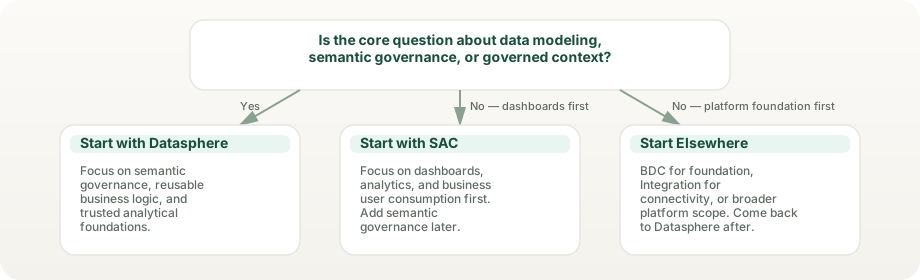
When teams need semantic consistency, reusable KPI logic, and a controlled place for business meaning.
When the semantic foundation and the user-facing decision layer both need to mature together.
When the main issue is executive consumption, planning workflow, deep integration engineering, or broader platform-runtime design.
Most problems come from unclear boundaries, not from the idea of semantic governance itself.
That framing hides the real value of governed meaning and reusable analytical structure.
When front-end tools hold too much logic, trust and maintainability degrade over time.
Datasphere discussions become unhelpful when every enterprise data ambition is folded into one layer.
Reusable meaning does not stay reusable without ownership, review cadence, and release discipline.
The same layer matters for different reasons depending on whether you design, govern, consume, or sponsor the analytics system.
Understand Datasphere as the place where business meaning is organized before analytics becomes visible.
Focus on reusable KPI logic, cleaner models, and less duplication across analytics work.
Use Datasphere to define semantic boundaries and keep consumption, integration, and platform concerns distinct.
Judge it by trust, reuse, and fewer number disputes rather than by how visible it is to end users.
Current SAP material makes Datasphere more concrete than a generic "semantic layer" label. It ties the product to Spaces as operating boundaries, analytic models for exposure, Data Access Controls for governance, semantic types for consistency, and data products in Business Data Cloud for governed reuse. The product story has moved beyond storage toward meaning and reuse.
SAP positions Datasphere as the place to integrate, model, and manage relevant business data rather than as a passive store. That matters because semantic work and operational work remain linked.
Spaces are secure work areas with their own storage, workload settings, and administrators. They are not only folders for content; they are part of the control model. Space copy and more file spaces per tenant arrived in 2026.
Analytic models, semantic types, exposed views, and data products enable downstream consumption. The handoff design is part of the product, not an afterthought. Teams can curate and publish governed data products for self-service discovery.
Privileges, Data Access Controls, semantic types, glossary terms, catalog assets, and lineage-oriented governance are all part of how Datasphere turns reusable meaning into durable trust.
These are the best current checkpoints for how Datasphere is positioned, how data is exposed, and how permissions and governance features actually work in the product.
Datasphere creates value when it becomes the source of truth for shared business meaning. These illustrative scenarios show typical ways organizations resolve metric disputes, enable reuse, and accelerate analytics delivery.
A manufacturer had several conflicting definitions of revenue across BW queries, SAP reports, and SAC models. Finance and operations were constantly arguing about which number was right.
Analytics requests were bottlenecked. A large analyst community had standing requests waiting weeks for data. Each request required custom models that duplicated work.
A retailer had more than a dozen separate cloud pipelines feeding data from e-commerce, CRM, web analytics, and SAP. Data definitions and update timing were inconsistent across systems.
Sapphire 2026 update. At SAP Sapphire 2026, Datasphere’s role sits inside the SAP Business Data Cloud fabric, now anchored by SAP HANA Cloud as the native AI database and extended with Joule agents (announced in private preview) that generate analytical and planning models from natural-language intent. Multi-domain master data (via the completed Reltio acquisition) and SAP Master Data Governance moved into the same governed fabric. Read the full analytics-lens analysis →