How this page is organized
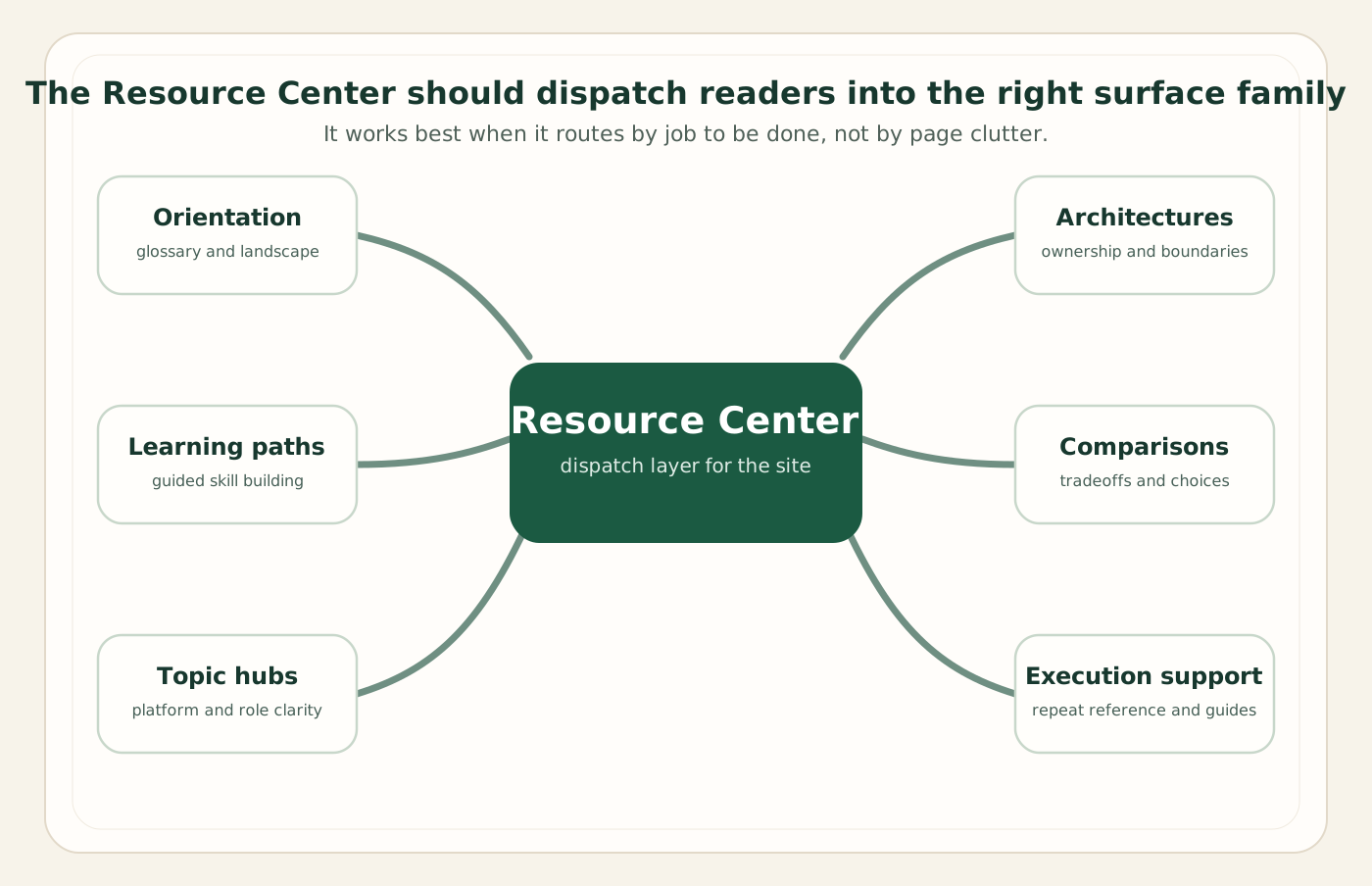
I have laid the resources out as a navigation system rather than a catalog. Orientation sits in the middle; from there you branch into learning, topic depth, architecture decisions, comparisons, and execution. Most people do not need everything — they need the one route that matches the decision in front of them. The map below is the same mental model I use when I onboard a new analyst onto a project: start at the center, pick a direction, and follow it until the question is answered.
A word on how I chose external links. SAP reorganizes its web estate often, and the casualty is always the deep
link — a specific course slug or a documentation anchor that worked last quarter and 404s this one. So everything
I send you to outside this site is a landing page: help.sap.com documentation homes,
the learning.sap.com portal, community.sap.com topic hubs, and the official product
roadmap board. From those landing pages the current courses, tutorials, and reference topics are one search away,
and they stay reachable even after SAP renames things. Where a resource lives better on this site than off it, I
link the internal page instead.
Sunil's Recommended Starting Points
If you read nothing else here, read these four. They are the pages I send to clients, new joiners, and the occasional executive who wants to understand the platform without sitting through a vendor deck. Each one is deliberately self-contained, and together they form a complete orientation: what the landscape looks like, how the core products relate, where you fit, and how to learn the rest.
SAP Analytics Landscape 2026
The practitioner's map of the whole estate — SAC, Datasphere, Business Data Cloud, BTP, AI, and integration — and how the layers actually fit together in 2026. If you are new to the platform, this is page one.
How SAC, Datasphere & BDC Fit Together
The single most common point of confusion, resolved: consumption versus semantics versus platform. Read this once and the rest of the product literature stops contradicting itself.
The 15-Week Learning Path
A staged route from foundations to architecture, with role-based tracks. Designed for people who want to become genuinely useful, not just pass a quiz.
Executive Guide
The strategy-level view for leaders who need the architecture story, the commercial shift to capacity pricing, and the decisions that matter — without the implementation detail.
The honest advice: do not start with SAP's product pages. Start with orientation. The vendor material is excellent reference once you know what you are looking at, and genuinely disorienting before that. Get the shape of the landscape first; then the documentation becomes a tool instead of a maze.
1. Landscape 2026: A Practitioner's Map
The first resource is the one I wrote precisely because it did not exist anywhere else: a single, honest map of the SAP analytics landscape as it stands in 2026. Most "overview" content is either a product pitch or a feature list. SAP Analytics Landscape 2026 is neither — it is the layered mental model I use on every engagement, written for someone who needs to make decisions rather than admire a diagram.
It matters now because the ground genuinely moved. Since January 1, 2026, SAP Analytics Cloud and SAP Datasphere can no longer be bought with SAP BTP cloud credits (BTPEA, CPEA, or pay-as-you-go) for new subscriptions, and SAP's pricing pages now license both through Business Data Cloud capacity units; credits bought before 2026 run to the end of their term. That single packaging change rewires how you scope a program, how you price it, and how you explain it upstairs. If your understanding of the landscape predates that shift, the map is the fastest way to refresh it.
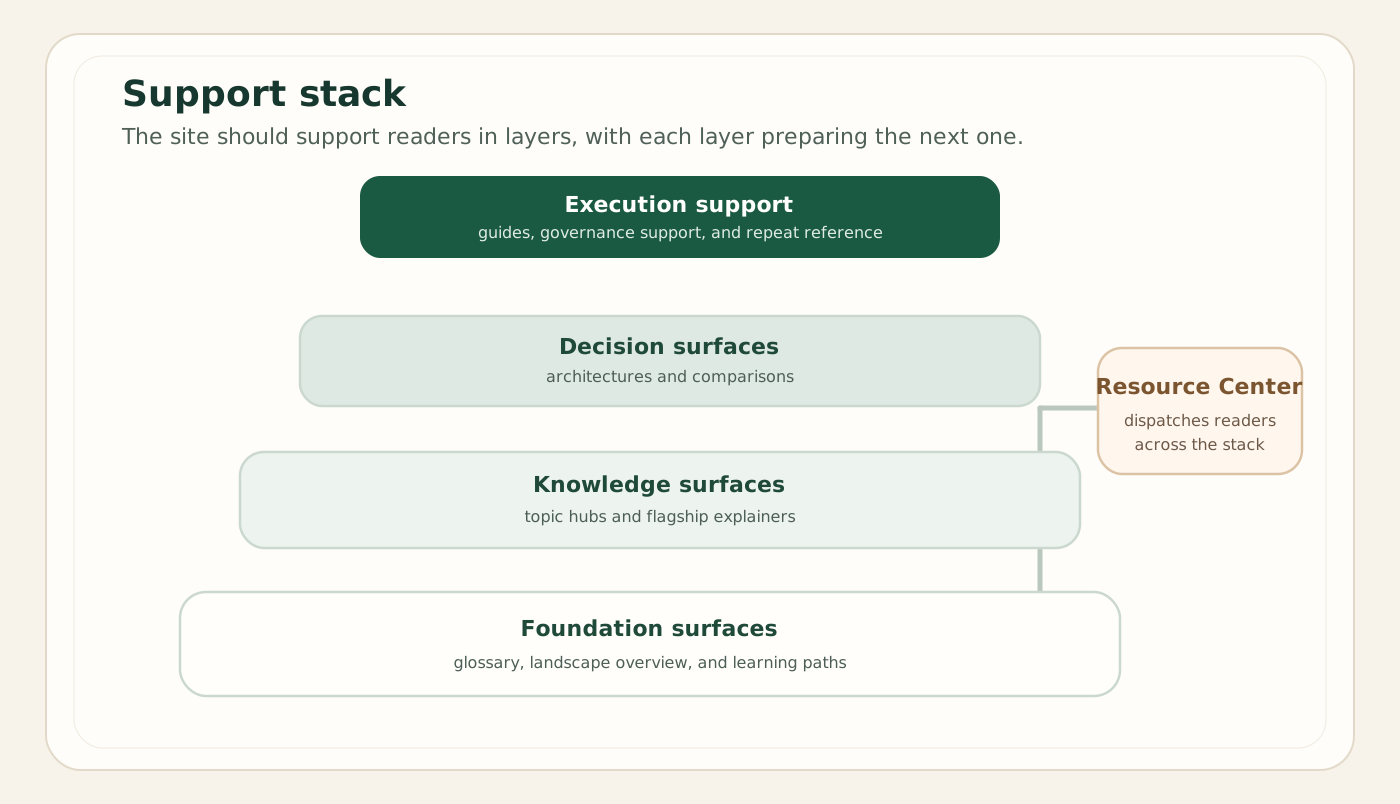
The landscape page sets up everything else on this site. Once you have the three-layer model — consumption at the top, semantics in the middle, platform underneath — the topic hubs stop reading like a glossary and start reading like a system. Read it first, then use the reading order below to go deep where you need to.
Essential Reading Order: Deep Dive Through SAP Analytics
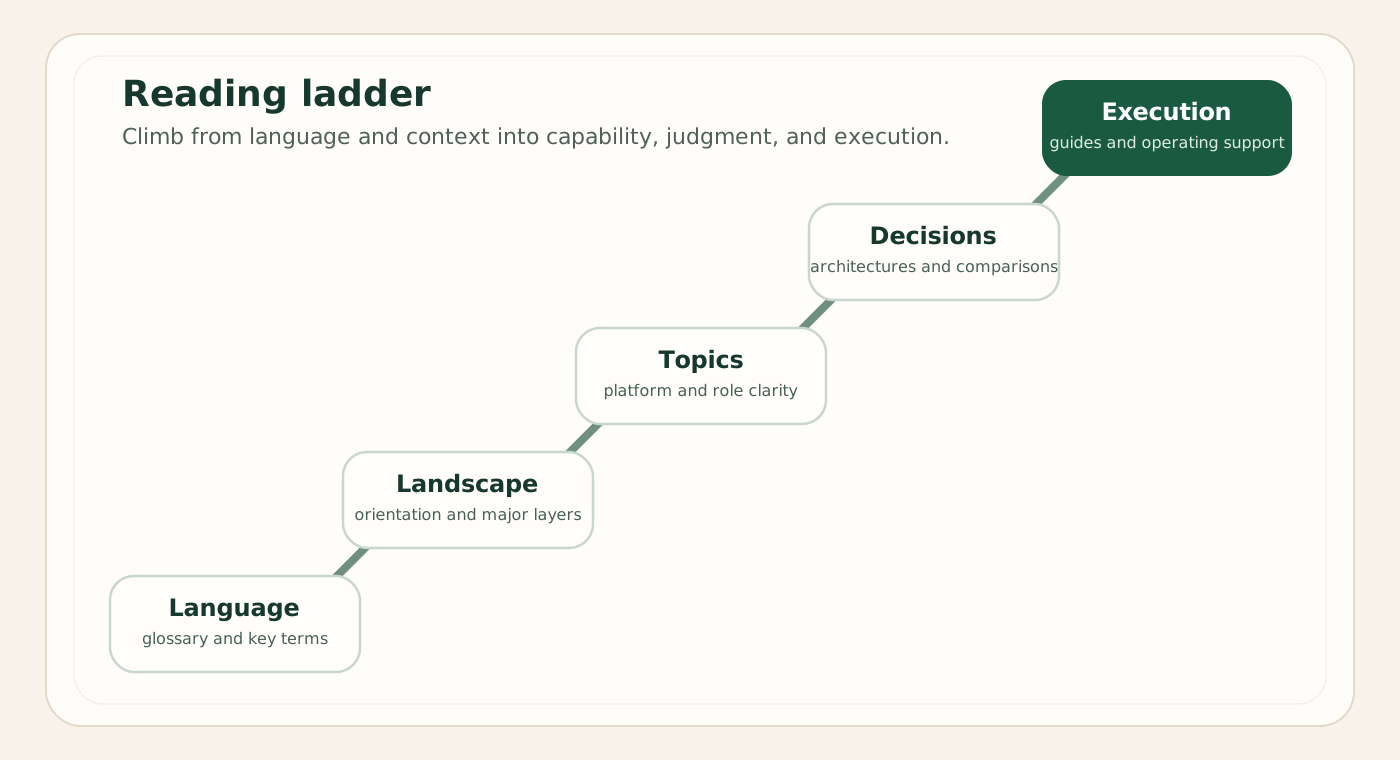
This is the heart of the page. The site has more than sixty pages, and read in the wrong order they overwhelm; read in the right order they compound. Below is the route I would actually walk a capable newcomer through — a ladder from orientation, through the semantic core, into architecture decisions, then comparisons and execution. Each rung assumes the one before it. You do not have to climb the whole thing, but you should not skip rungs.
Rung 1 — Orient yourself
Begin with the Landscape 2026 map, then read how SAC, Datasphere and Business Data Cloud fit together. These two pages give you the vocabulary and the layer model. With those in hand, skim the topic hub index to see the full territory before you choose a direction.
Rung 2 — Understand the semantic core
The semantic layer is where SAP analytics either becomes governable or becomes a sprawl of one-off models, so this is the rung most people under-invest in. Read the Datasphere hub for the product context, then semantic layer design for the modeling discipline itself — spaces, facts and dimensions, analytic models, and lineage. Follow it with data products: governance and reuse to see how that discipline becomes a published, owned asset rather than tribal knowledge. If you want to feel the workflow end to end, walk through building your first data product.
Rung 3 — Decide where things belong (architecture)
Once you can model, the hard questions become architectural rather than technical: not "can I build this?" but "where should it live?" Start at the architectures hub, then read the three decision pieces in sequence — where the semantic layer should live, governance and control boundaries, and integration versus platform-extension boundaries. These are the calls that determine whether a program ages well or accretes debt.
Rung 4 — Compare the real alternatives
Architecture decisions are choices between options, so the comparison pages come next. Open the comparisons hub, then read the ones relevant to your decision: SAC vs Datasphere (the most common false dichotomy), Datasphere vs Business Data Cloud (product versus bundle), Datasphere vs Snowflake and SAC vs Power BI for the non-SAP boundary, and BW: modernize or still fit? if you carry a legacy warehouse. Comparisons are where strong opinions get tested against trade-offs.
Rung 5 — Execute, and connect the rest of the estate
The top rung is delivery. The implementation guides turn the decisions into steps: SAC data modeling implementation and Datasphere governance implementation. Because no real enterprise is purely SAP, finish with the integration material — the integrations hub, non-SAP integration patterns, and the specifics of BDC Connect for zero-copy access to external clouds. By the time you reach this rung, the integration pages read as design choices rather than connector trivia.
If you only have an afternoon: Landscape 2026 → SAC/Datasphere/BDC relationships → the one comparison that matches your decision. That three-page path answers most of the questions I get asked in real engagements.
Official SAP Documentation (2026 Products and Capabilities)
Once you know the shape of the landscape, SAP's own documentation becomes genuinely valuable — it is the authoritative record of what each product does today, and it is kept current. I link the documentation homes rather than individual topics on purpose: a docs home survives reorganizations, carries the working search box, and lets you reach the exact reference page for your version without me sending you to a link that may have moved. Treat these as the front doors to the official reference, and let SAP's own navigation take you the last step.
SAP Analytics Cloud documentation
Stories, planning, the optimized story experience, Joule, and Smart Predict. The reference home for everything business users touch.
SAP Datasphere documentation
Spaces, facts, dimensions, and analytic models (built in the Data Builder; the Business Builder is deprecated), data access controls, and lineage — the reference for the semantic core of the platform.
SAP Business Data Cloud documentation
The unified data offering: data products, BDC Connect, BW modernization, SAP Databricks and SAP Snowflake, and SAP Reltio for master data. Start from the documentation home, whose first links include "What is SAP Business Data Cloud?", then branch into capabilities.
SAP BTP documentation
The platform everything runs on, now presented by SAP as a core part of the SAP Business AI Platform — AI Core, Cloud Foundry, Kyma, and the integration services. Essential once you start extending or integrating rather than just consuming.
SAP Business AI & Joule
Joule assistants and agents, the AI services and models, and the Knowledge Graph. The product home for the conversational and agentic layer that now sits across the suite.
SAP Road Map & documentation home
The official roadmap board for planned and delivered capabilities (sign in with a free SAP account), plus the documentation home that searches across every product. Use the roadmap to separate "available" from "announced."
How to read SAP roadmaps without getting burned: the roadmap board is the right place to check timing, but read the status field carefully. As of November 2026, the BDC Connect connectors are at very different stages — Databricks reached general availability in October 2025, Snowflake on May 4, 2026, and Google BigQuery in July 2026, while Microsoft Fabric is still in public preview (GA planned for the second half of 2026) and Amazon Athena is planned for the first half of 2027. "Planned" is not "shipped." When a date matters for a real decision, confirm it against SAP's own current communications rather than against any third-party summary, including mine.
SAP Learning and Certification
Reading builds understanding; structured learning and certification build credibility and fill the gaps you did not know you had. SAP's free learning portal is genuinely good now — the journeys are well produced and the knowledge-check format works. I deliberately link the learning portal and the certification hub rather than individual course slugs, because the course catalog is reorganized constantly and specific journey URLs are the first thing to break. From the portal, search the product you want and follow the current journey; from the certification hub, find the live exam codes and the official prep.
SAP Learning portal
Guided learning journeys with knowledge checks across Analytics Cloud, Datasphere, Business Data Cloud, and Business AI. Free to use; create an account to track progress. Search the product and follow the current journey.
SAP Certification hub
The official certification catalog and exam codes. The analytics-relevant credentials include the SAC data analyst exam (C_SAC), BW/4HANA (C_BW4H), and the two Business Data Cloud exams (C_BCBDC and C_BDCDA). Since 2026 every SAP exam is practical—scenario-based or system-based—so confirm the current format and pass score on the hub before you book.
For my own take on which certifications are worth the time, how they map to roles, and how to prepare without wasting weeks on dumps, read the site's dedicated guide: SAP Analytics Certifications — paths to mastery. It covers the credential landscape — including C_SAC, C_BW4H, C_BCBDC, and C_BDCDA in their 2026 practical format — with preparation strategy and career framing rather than a list of exam objectives. Pair it with the 15-week learning path, which sequences the underlying skills so the certification becomes a checkpoint on a real learning curve instead of an isolated cram.
My honest position on certification: a certificate proves you studied; it does not prove you can design. Use the exams to force breadth and to give a hiring manager a recognizable signal, but never mistake the credential for competence. The architecture decisions on this site — where the semantic layer lives, where governance boundaries fall — are not on any exam, and they are what actually separate a useful practitioner from a certified one.
The Community: Where the Edge Cases Live
Documentation tells you how a feature is supposed to work. The community tells you how it behaves at 11 p.m. when the load fails and the error message makes no sense. SAP's community is where practitioners post the edge cases, the workarounds, and the "has anyone else hit this?" threads that never make it into official material. It is uneven — some answers are gold, some are years out of date — but for a specific, stubborn problem it is often the fastest route to a real answer.
SAP Community
Q&A, blogs, and topic pages maintained by practitioners and SAP staff. Search before you post — most problems have been hit before. Strong for Datasphere modeling questions and integration gotchas.
This site's glossary
When a community thread or a doc page uses a term you do not know, the glossary defines the site's full vocabulary — from analytic model and capacity unit to Joule Studio and SAP-RPT — in architecture-aware language.
A note on what I deliberately left out
You will notice this page is shorter on external links than most resource pages, and that is a choice rather than an oversight. I left out individual course URLs, blog-post permalinks, and third-party tutorials — not because they are worthless, but because they rot. A link that 404s is worse than no link: it wastes your time and quietly erodes trust in everything else on the page. So I have linked only durable SAP landing pages and this site's own articles, both of which I can keep working. If a resource I would have recommended lives behind a fragile URL, I have pointed you at the stable home it sits under and trusted you to take the last step. That is the same standard I hold the rest of this journal to: no slogans, no affiliate links, and nothing that breaks the moment you click it.