Audience: practitioner to architectScope: SAP plus non-SAP data, metadata, process, and action routesResource check date: November 2026Last reviewed: November 2026
How to read this page: start by naming the non-SAP system role first. Then choose the movement pattern, define the semantic checkpoint, and only after that decide whether you also need runtime extension or heavier governance redesign.
Flagship topic hub
Integrations
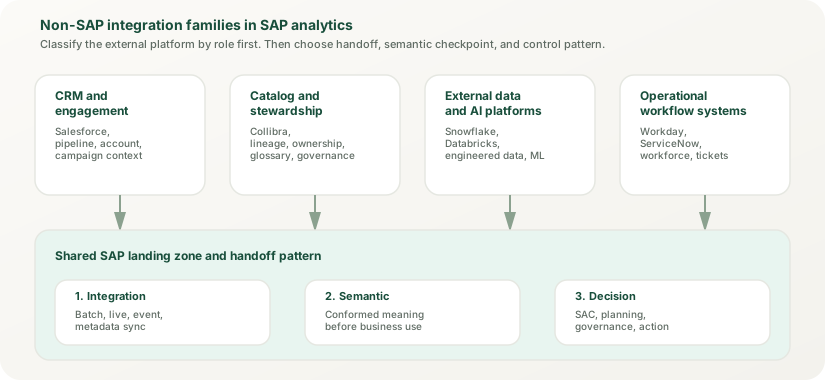
Integrations in SAP analytics are not a connector catalog. They are the discipline of bringing non-SAP business context into SAP decision surfaces without losing meaning, timing, ownership, or control. Salesforce, Collibra, Snowflake, Databricks, Workday, and ServiceNow can all feed the estate, but they do not all play the same architectural role. Good integration design starts by naming the role first, then choosing the cleanest handoff into SAP Datasphere, SAP Analytics Cloud, and the surrounding operating model.
Plain-English rule: a mixed SAP and non-SAP analytics landscape only stays trustworthy when teams can explain what is moving, what remains authoritative, where business meaning is stabilized, and who owns the handoff when something breaks.
Read the ecosystems by role, not by vendor name. CRM, catalog, engineering-platform, and workflow systems enter SAP analytics through different control paths.
Start here
Think in four tests
Is the non-SAP system providing operational context, metadata context, engineered data, or workflow state?
Where will business meaning be stabilized before SAP Analytics Cloud consumes the result?
Which refresh, event, or synchronization rule actually fits the use case?
Can the team trace ownership across SAP and non-SAP boundaries when metrics or states diverge?
Best fit
Use this topic when trust depends on a handoff between platforms
This topic is strongest when CRM, catalog, external data platforms, operational systems, or partner applications have to feed a governed SAP analytics surface. It is weaker when the real issue lives fully inside the semantic model, dashboard layer, or extension runtime.
Integration architecture
SAP Integration Suite and the broader integration ecosystem
The modern integration pattern centers SAP Integration Suite as the core platform, connecting to S/4HANA, Salesforce, Workday, ServiceNow, Databricks, Snowflake, and other cloud platforms through standardized flows, event-driven architecture, and zero-copy data sharing.
Four movement patterns (batch extraction through CDS views, ODP, and SLT; API and event-driven access; zero-copy sharing through BDC Connect; and federation) all have to carry the same integration unit: business meaning, timing, ownership, and action context. BDC Connect is generally available for Databricks (October 2025), Snowflake (May 2026), and Google BigQuery (July 2026).
Integration role
What integrations actually have to preserve
The unit of integration is not just a record. It is the package of business meaning, timing, ownership, and process context that lets a decision remain trustworthy after information leaves one platform and appears in another.
Business meaning
Opportunity stages from Salesforce, service statuses from ServiceNow, job families from Workday, and catalog terms from Collibra must stay intelligible once they reach SAP analytics.
Timing logic
Some use cases want scheduled batch, some need live access, and some need change events. Latency expectations shape trust more than connector availability does.
Ownership
Every handoff needs a named owner across both landscapes so broken mappings, duplicate logic, and source drift do not vanish into a gray zone between teams.
Action context
Analytics often triggers follow-up in CRM, service, workforce, or stewardship processes. If that action path is unclear, the dashboard may be polished but operationally weak.
System roles
Read non-SAP systems by the job they perform in the analytics stack
Mixed landscapes become easier to reason about when you stop talking about tools in the abstract and start naming the role each platform plays in the decision chain.
Operational context
Salesforce and other CRM platforms
Use CRM platforms to bring pipeline, campaign, account, service, and activity context into SAP analytics. The main risks are inconsistent stage logic, duplicated customer entities, and report-level metric fixes that should have been solved upstream.
Metadata context
Collibra and catalog platforms
Use catalog and stewardship tools to document assets, lineage, ownership, and glossary relationships. They complement SAP analytics governance, but they do not replace semantic modeling or access design inside SAP platforms.
Engineered data
Snowflake, Databricks, and external data platforms
Use engineering platforms when the landscape needs large-scale data preparation, data science, or shared enterprise pipelines. The key architecture question is where business semantics become stable enough for SAC consumption.
Workflow state
Workday, ServiceNow, and operational systems
Use these systems when the decision surface depends on workforce, service, asset, or approval-state context. They often create stronger timing and exception-handling needs than classic batch analytics teams expect.
Control map
Where mixed-landscape integration failure usually starts
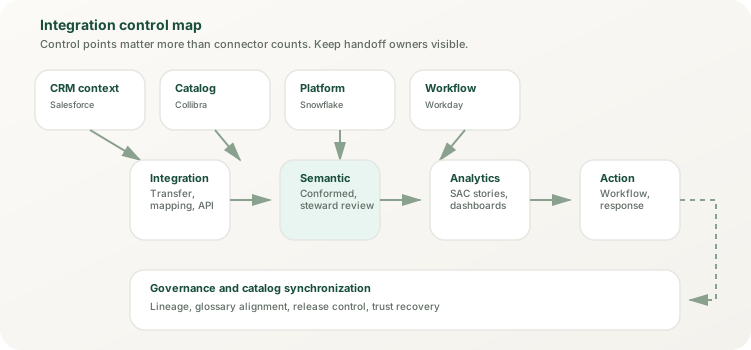
Teams often debate platforms while the real break happens at the ownership boundary. The control view has to show where non-SAP context enters, where semantics are standardized, and where governance or stewardship checks live before analytics consumption.
The control map keeps integration honest: CRM, catalog, external data platforms, and workflow systems all need visible handoff ownership before a KPI reaches business users.
Movement patterns
Choose the movement pattern that fits the business question
Good integration design chooses the simplest movement pattern that still protects trust, latency, and ownership. More movement or more real-time processing is not automatically more mature. The right pattern depends on how the data will actually be used and who will own the handoff when it breaks.
1
Replicate
Best when history, planning, auditability, and reusable models need controlled copies of source data inside the analytics foundation. Replication creates a durable copy that survives source changes, enables incremental loading and version control, and allows the analytics layer to maintain its own operational schedule independent of source availability.
Example: Salesforce opportunity history, Workday employee records, service ticket archives.
2
Federate
Best when freshness, data-sovereignty constraints, or platform-local processing matter more than owning another physical copy. Federated access means the analytics surface queries the source directly, which keeps overhead low but increases dependency on source availability and requires clear ownership of performance and reliability across system boundaries.
Example: Live access to cloud-native data warehouses, restricted-geography datasets, real-time monitoring sources.
3
Trigger by event
Best when the analytics signal has to follow process change, exception handling, or operational thresholds instead of waiting for the next batch window. SAP Event Mesh and related event-aware services matter when timing is part of the trust model and when delayed response creates business risk. Event-driven patterns require clear ownership of event handling, error recovery, and replay logic.
Example: Exception-driven analytics escalation, threshold-triggered planning cycles, operational dashboard updates tied to system events.
4
Synchronize metadata
Best when the goal is stewardship, catalog coverage, glossary alignment, or lineage visibility rather than another fact-table movement project. Metadata synchronization keeps the governance story consistent across SAP and non-SAP systems so teams can understand who owns each asset and how it connects to other systems.
Example: Glossary term alignment between Collibra and Datasphere, lineage from Snowflake through SAP Datasphere to SAC, ownership tracking across integrated systems.
Operating flow
How cross-platform analytics should move
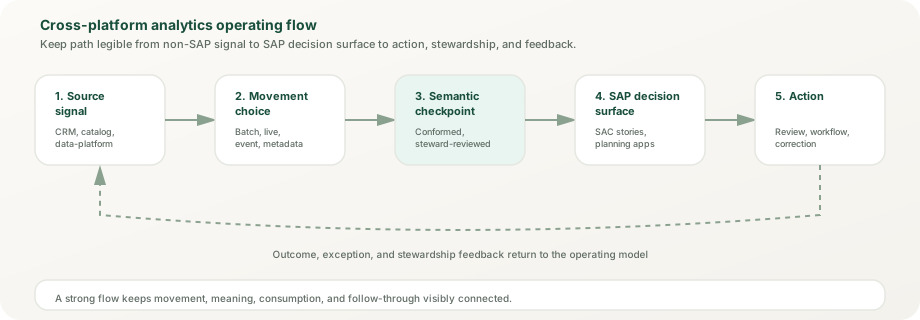
Strong integration architecture is an operating flow, not a pile of adapters. It should tell a clean story from non-SAP signal to semantic preparation to analytic consumption to action or review.
The healthiest flow keeps semantic validation explicit before SAC consumption and returns action outcomes to the operating loop instead of leaving analytics detached from source processes.
2026 capability
BDC Connect: zero-copy data sharing across platforms
SAP Business Data Cloud Connect represents a fundamental shift in how SAP analytics accesses non-SAP data. Instead of replicating or federating data, BDC Connect enables zero-copy, bidirectional sharing of SAP-managed and custom data products: data stays where it is managed and is shared in place. Shared partner data reaches SAP analytics as data products, and SAP data products can be shared into the partner platform. It needs a BDC subscription and a BDC Connect instance in the same region and hyperscaler as the data products (SAP Note 3699756); inter-region transfer and API processing are metered in capacity units.
Databricks
GA since October 2025. Sharing runs through Delta Sharing (which Databricks now calls OpenSharing) and Unity Catalog, so Databricks tables can be shared into BDC and SAP data products can be shared into Databricks without copies. Shared data can then be modeled semantically in SAP Datasphere. SAP Databricks, the SAP-managed edition inside BDC, is a separate offering.
Snowflake
BDC Connect for Snowflake reached GA on May 4, 2026, alongside SAP Snowflake, the SAP solution extension that runs Snowflake inside BDC. Bidirectional zero-copy sharing lets Snowflake consume SAP data products and publish its own data back to BDC. Enables consistent analytics without replication overhead. Metering is in capacity units for inter-region data transfer and API processing requests, not per query.
Google BigQuery
GA since July 2026 (for BDC running on Google Cloud and AWS; Azure-hosted BDC was listed as coming soon). Zero-copy sharing between SAP data products and BigQuery extends the analytics reach into Google-centric data estates without replication.
Microsoft Fabric
Not generally available as of November 2026: announced in November 2025 with GA first planned for Q3 2026, BDC Connect for Microsoft Fabric is in public preview, with no GA announcement yet. Until it reaches GA, Microsoft-centric organizations can replicate Fabric data into Datasphere instead (Microsoft OneLake is a replication-flow source). Separately, BDC Connect for Amazon Athena has GA planned for H1 2027.
Enterprise partnerships and intelligent integration
Building intelligent applications on unified data platforms
Enterprise technology partners are building on SAP Business Data Cloud. At SAP Sapphire 2025, SAP named Adobe, Moody's, Palantir, and Thomson Reuters among the partners building applications on BDC that combine SAP business data with their own data, for example Moody's risk data and Thomson Reuters trade and tariff content.
Palantir Foundry + BDC integration
SAP's partnership with Palantir centers on Palantir Foundry and AIP (Artificial Intelligence Platform): at Sapphire 2025 for cloud migration and a harmonized data foundation with BDC, and in May 2026 for AI-supported data migration tooling offered as an SAP solution extension. For analytics teams, the relevance is cleaner, harmonized data arriving in BDC during migration, not a separate analytics stack. Check current availability and licensing with SAP before planning on it.
Reltio master data integration
SAP announced its acquisition of Reltio in March 2026 and completed it on May 7, 2026, strengthening AI-ready master data management. SAP Reltio is now generally available inside SAP Business Data Cloud, with unified data-product capabilities planned for Q1 2027. Reltio's AI models score match confidence, data quality, and entity relationships. Organizations can bring Reltio's mastered reference data (customer hierarchies, vendor and location entities) into the same governed fabric as their SAP data. Advantage: a single golden customer or vendor record across SAP and non-SAP sources. Check how SAP Reltio is licensed in your BDC contract.
SAP + Snowflake partnership for data fabric
The SAP–Snowflake partnership announced in November 2025 combines SAP BDC with Snowflake's zero-copy sharing in two offerings: SAP Snowflake inside BDC and BDC Connect for existing Snowflake accounts (both GA since May 2026). Snowflake can consume SAP data products and share its own data back to BDC, where it becomes discoverable in the BDC catalog. Snowflake Cortex (the AI feature set) can score, classify, or translate data before SAP Datasphere consumes it. Composite use case: a global CPG company maintains product master data in SAP, enriches it in Snowflake, using Cortex AI functions to help match records across company data, purchase history, and third-party reference data, then exposes a unified view through Datasphere to SAC and partner analytics platforms.
AI-powered integration workflows
AI is moving into integration work. SAP Integration Suite can generate integration flows, including preconfigured connectors and mediation steps, from natural-language prompts, which developers then review and complete. On the data side, SAP previewed Joule agents in Business Data Cloud (private preview at Sapphire 2026) that generate analytical and planning models from natural-language intent. Example prompt: "Join Salesforce opportunities to SAP orders and flag orders that closed with no opportunity record." The output is a draft that a modeler validates. This shifts integration engineering from boilerplate to governance and business logic design.
Connector landscape
SAP Analytics Cloud exposure and SAP Integration Suite capabilities
SAP Analytics Cloud combines live connections to SAP sources (and, through its data access agent, to Google BigQuery, Snowflake, and Azure SQL) with import connections to SAP and non-SAP systems. Datasphere adds remote tables (federation) and replication flows for many sources, while Databricks and Snowflake data can also arrive as BDC Connect data products. SAP Integration Suite provides the orchestration layer for complex multi-system flows with governance checkpoints.
SAC import and live connections
SAP Analytics Cloud offers import connections for SAP systems (S/4HANA, BW, BPC, SuccessFactors, Concur, Fieldglass, Integrated Business Planning, and others), SQL databases through the SAC agent, generic OData services, Salesforce, Google Drive and BigQuery, Qualtrics, and Dow Jones, plus SAP Integration Suite Open Connectors for many other SaaS applications. Live connections cover SAP HANA, S/4HANA, BW, BPC embedded, universes, and Datasphere, and since 2026 Google BigQuery, Snowflake, and Azure SQL through the data access agent. For downstream systems, the Data Export Service API exposes SAC model data over OData.
Datasphere Federation & Replication
Datasphere can replicate data from non-SAP sources (replication flows, data flows) or federate live queries through remote tables, depending on the connection type. OData consumption APIs and SQL access for database users expose models to SAC and third-party tools. Data access controls (DACs) enforce row-level security (they do not mask columns). The Snowflake connection type is a replication-flow source only (no remote tables), and there is no dedicated Databricks connection type; both platforms share data zero-copy through BDC Connect, and live federation goes through a Generic JDBC connection (remote tables via the Data Provisioning Agent).
SAP Integration Suite (CPI)
Cloud Integration (the capability long abbreviated CPI) orchestrates data flows between systems with transformation logic, mapping, and error handling. Event Mesh enables event-driven architecture for real-time triggers. API Management exposes SAP systems as REST endpoints for consumption by non-SAP analytics platforms. Open Connectors provide lightweight SaaS connectors for over 160 cloud applications.
OData / ODBC / SQL Exposure
Datasphere exposes views and analytic models through OData V4 consumption APIs (relational and analytical) for partner tools. Database users with an Open SQL schema can connect through the SAP HANA client (JDBC or ODBC) to query exposed data with SQL. Sharing with Snowflake and Databricks runs through BDC Connect rather than SQL endpoints.
SAC connectivity deep dive
Complete SAP Analytics Cloud connection types
SAP Analytics Cloud's connection model is split between live queries and periodic import. Understanding which connection type fits each data source is foundational to good integration design.
Live connections
Live connections in SAC query the source system directly without storing data in SAC. These work best for S/4HANA, SAP BW/4HANA, SAP HANA Cloud, SAP Datasphere, and SAP BusinessObjects universes; on tenants running on SAP HANA Cloud, the data access agent adds read-only live access to Google BigQuery, Snowflake, and Azure SQL. Live connections require source system availability, stable network bandwidth, and acceptable query response times. Response times depend on the source model and its tuning, so test with realistic data volumes and concurrency. Use live connections when data changes frequently, historical snapshots are not required, or source system governance controls are the natural authority.
Import connections
Import connections bring data into SAC on a defined schedule (hourly, daily, weekly). SAC stores the imported data, allowing complex calculations, time-series analysis, and planning scenarios that would be too slow or resource-intensive against the source. Import works for databases (through the SAC agent's SQL database connection), cloud services (Salesforce, Google Drive, Concur), and OData sources. Import trade-off: data freshness lags behind source truth, but analytics independence and performance improve. Import duration depends on data volume and source API limits, so schedule large loads outside business hours.
Application connectors
SAC's application-specific import connections handle credentials and source-specific logic. Examples: the Salesforce connection handles OAuth and object selection; the Google Drive connection imports sheets and files; the Concur connection handles Concur's APIs. They reduce integration engineering effort but are less flexible than generic SQL or OData connections. Use them when the source system has an official SAC connector and your data model aligns with the connector's standard mapping.
Exposing SAC data downstream
When SAC itself must expose data to downstream consumers (Tableau, Looker, Power BI, custom applications), use the Data Export Service API, an OData-based open API that returns model data through an OAuth client set up for API access; the Data Import Service API covers the reverse direction for planning models. Treat the API as the supported path, and if many tools need the same numbers, publish them from Datasphere instead, where the governed model lives.
Datasphere connectivity
Complete source catalog and connection patterns
SAP Datasphere acts as the semantic layer where non-SAP data is standardized and integrated with SAP systems. Datasphere ships connection types for SAP systems, databases, cloud storage, data platforms, and SaaS applications, and each type supports a different mix of replication flows, remote tables, and data flows. Connection type (replication, federation, or batched file load) depends on data volume, refresh frequency, and whether the source is operational or analytical.
SAP sources
S/4HANA connections use CDS (Core Data Services) views, ODP (Operational Data Provisioning), or SLT (SAP Landscape Transformation Replication Server). CDS views with delta support are the usual source for transactional analytics (orders, invoices, deliveries) through replication flows. ODP provides change tracking for incremental replication from ABAP-based systems. SLT handles trigger-based, table-level replication for larger volumes. BW/4HANA connects via ODP for InfoProviders and queries. SAP HANA and SAP HANA Cloud connections support replication flows (as source and target) and real-time remote tables. A workable starting point is to replicate high-volume operational tables (orders, line items) and decide per object whether master data (customers, materials, vendors) is replicated or federated, based on freshness needs and source-system load.
Databases
Datasphere connects to Oracle, Microsoft SQL Server, and Azure SQL Database with replication flows, real-time remote tables, and data flows; to MySQL as a replication-flow source; and to other databases through Generic JDBC (remote tables only). Replication is typically batch-scheduled or delta-based; federation assumes the database can handle analytical queries. Many organizations replicate slowly-changing dimension tables (customers, products, locations) and federate fact tables if the source database is tuned for analytics. Row-level security is enforced by Datasphere's Data Access Controls after replication, not pushed to the database.
Cloud storage and lakehouses
Amazon S3, Google Cloud Storage, and Azure Data Lake Storage Gen2 work as replication-flow sources and targets (and with file spaces), while Azure Blob Storage is available in data flows only. Snowflake is a replication-flow source; Snowflake and Databricks also share data through BDC Connect or federate through Generic JDBC. Use zero-copy sharing or federation for curated analytical tables (marts) where the connection type allows it, and replication for transactional sources that must be joined with SAP data inside Datasphere's semantic layer.
Cloud and SaaS applications
SAP SuccessFactors has its own connection type (remote tables and data flows) for HR attributes, organization hierarchies, and compensation tables. Other SaaS sources (Salesforce opportunities and accounts, ServiceNow incidents and CMDB data, Jira issues, Concur expense reports, Shopify orders) are typically reached through SAP Integration Suite Open Connectors (usable in Datasphere data flows), Generic OData, or Cloud Integration flows. Each requires API key management, request throttling, and error handling. Replication is more common than federation for SaaS because API rate limits and uptime constraints make live federation fragile. A typical Salesforce sync replicates daily, capturing changes since the last run using Salesforce change data capture or a timestamp filter.
SAP Integration Suite for analytics
Cloud Integration (CPI) flows and analytics content packs
SAP Integration Suite (specifically Cloud Integration, still widely called CPI) is the orchestration engine for complex multi-system analytics flows. CPI is not a data warehouse; it is a middleware layer that handles transformation, mapping, error recovery, and event triggering between SAP and non-SAP systems. For analytics use cases, CPI typically sits between operational source systems and Datasphere or SAC.
iFlow design for analytics
An iFlow (integration flow) is a CPI artifact that defines source system connection, data extraction logic, transformation rules, and target routing. For analytics, typical iFlows move data from operational systems (Salesforce, ServiceNow, external databases) into Datasphere on a schedule or triggered by events. A Salesforce-to-Datasphere iFlow extracts opportunities and accounts nightly, maps Salesforce stage picklist values to a canonical stage dimension, and loads into Datasphere entity tables. CPI handles API pagination, error retry, and dead-letter queues for records that fail validation. Prebuilt integration packages are available in SAP Business Accelerator Hub; many organizations build custom iFlows using the visual designer and Groovy or JavaScript scripts.
Integration content packages
SAP Business Accelerator Hub lists prebuilt integration packages for many SAP and third-party systems, but not for every analytics target, so check whether a package covers your source before building from scratch. Packages contain iFlows, mappings, and configuration guidance. They are starting templates, not production-ready deployments: an organization importing a package still needs to customize field mapping for its own schema, define refresh schedules aligned to its business calendar, and build monitoring alerts.
Event Mesh and analytics timing
Event Mesh (the Event Mesh capability of Integration Suite, or advanced event mesh for high volumes) enables event-driven analytics flows where data movement is triggered by business events instead of scheduled time windows. A Salesforce opportunity status change is forwarded as an event (for example by an integration flow that receives Salesforce change events); a Cloud Integration flow consuming that event pulls the updated opportunity and refreshes the Datasphere fact table in near real-time. Event-driven patterns are best for high-impact threshold scenarios (orders exceeding $1M, incidents marked critical, employee terminations) where delayed response creates business risk. For routine daily analytics, scheduled batches are simpler and more reliable.
Transformation and enrichment patterns
CPI iFlows can enrich data during movement. A Salesforce account integration can join Salesforce account data with SAP customer master to verify dual records, flag orphaned accounts, and calculate account age or contract value. Enrichment logic lives in CPI's mapping tool or in custom Java libraries. Complex enrichment (ML scoring, external lookup calls) may push data through an external enrichment service before landing in Datasphere. Data enrichment in CPI shifts the semantic responsibility upstream, reducing modeling complexity in Datasphere but increasing orchestration complexity. The trade-off is typically worth it when enrichment logic must be reused across multiple targets or when source data inconsistencies need to be corrected before storage.
Salesforce integration deep dive
Architectures and semantic alignment
Salesforce is the most common non-SAP source in revenue analytics for SAP customers. Salesforce opportunity and account data must be integrated with SAP orders, invoices, and finance to create revenue intelligence. The integration architecture depends on whether your organization is Salesforce-centric, SAP-centric, or balanced.
Direct SAC import
The simplest pattern: SAC's Salesforce import connection pulls opportunities, accounts, and activities directly. SAC imports daily and creates calculations for pipeline value, stage aging, and forecast. This works well for smaller teams and organizations where Salesforce is the primary system and SAP is secondary. Limitation: Salesforce data lives in SAC isolation, not integrated with SAP orders or finance. Revenue reconciliation still happens offline.
Salesforce → CPI → Datasphere
Recommended pattern for large organizations with significant SAP operations. CPI pulls Salesforce opportunities and accounts via REST API, maps Salesforce stage values to a canonical stage dimension, joins with customer master to link Salesforce accounts to SAP bill-to customers, and loads into Datasphere. Datasphere becomes the semantic layer where Salesforce pipeline is joined with SAP revenue. A single semantic model exposes both pipeline and actual orders to SAC. Ownership: CPI integration team owns the handoff; Datasphere team owns semantic modeling; SAC team owns analytics consumption. This distribution of responsibility prevents silos.
Salesforce → MuleSoft → Datasphere
Organizations with existing MuleSoft deployments may use MuleSoft for Salesforce extraction instead of CPI. The architecture is similar: MuleSoft pulls Salesforce data, applies mapping and enrichment, and writes to Datasphere through a database user's Open SQL schema (JDBC) or to files that Datasphere loads. MuleSoft is more flexible than CPI for custom transformations but adds operational complexity if your organization is SAP-centric. Decision framework: use CPI if you are standardizing on SAP middleware; use MuleSoft if it is already your integration platform.
Semantic mapping patterns
Salesforce stage values (Prospecting, Qualification, Proposal, Negotiation, Closed Won) do not automatically map to SAP document status (New, In Process, Goods Received, Invoiced, Paid). A robust integration defines a mapping rule: Salesforce Closed Won maps to SAP In Process or Goods Received (depending on delivery), not directly to Invoiced. Opportunity amount currency may be in deal currency (EUR, GBP) while SAP orders are in posting currency (USD). Semantic mapping must handle this conversion. Account hierarchies differ: Salesforce has Account Name and Parent Account; SAP has Customer (bill-to) and Sold-to Customer. The integration must resolve which Salesforce account maps to which SAP customer, and what to do when the mapping is ambiguous (same company name, multiple SAP customers). This mapping logic is not purely technical; it requires finance, sales, and data governance input.
Workday integration
HR data for people analytics and workforce planning
Where Workday is the HR system of record, integrating it into SAP analytics enables people analytics (headcount trends, retention, hiring velocity), compensation planning (actual spend vs. budget), and workforce cost analysis (labor costs by business unit or project).
Workday Report-as-a-Service to Datasphere
Workday exposes custom reports via REST API (Report-as-a-Service). A Cloud Integration flow (iFlow) calls Workday RaaS daily to extract employees, organization hierarchies, compensation, and headcount changes. Data is mapped to a canonical employee entity in Datasphere. A typical extract includes employee ID, name, hire date, termination date, job family, job level, compensation tier, organization assignment, and cost center. Datasphere then links employee records to SAP finance (G/L cost centers, project assignments, salary expense accounts). A single semantic model exposes both Workday headcount and SAP labor expense.
People analytics use cases
Once Workday and SAP are integrated in Datasphere, common analytics include: headcount trend by month (hiring, termination, retention), average time-to-fill by job family, labor cost per FTE by business unit, headcount to revenue ratio (productivity metric), voluntary and involuntary turnover rates, and compensation distribution by level. These metrics require linkage between Workday organizational structure (which defines reporting lines and business units) and SAP financial structure (which defines cost centers and projects). The semantic layer must capture both to support these analyses.
Compensation planning integration
Organizations that run compensation and payroll in Workday manage pay reviews, merit increases, and bonuses there. Integration can feed actual compensation changes into SAP's planning layer (through SAP Analytics Cloud planning models or BPC for budgeting). When an employee is given a $50K merit increase in Workday, that change can automatically update the SAP labor cost forecast in near real-time. This requires tight synchronization and clear ownership of which system is authoritative. Typically Workday is authoritative for compensation definition; SAP is authoritative for actual expense recognition.
Organizational hierarchy synchronization
Workday organization hierarchies often conflict with SAP organizational structures. Workday tracks reporting lines (who reports to whom) and company assignments; SAP tracks cost centers, profit centers, and company codes. A single employee might be assigned to multiple SAP cost centers or projects but have only one Workday manager. Integration must flatten Workday hierarchy into Datasphere dimensions that SAP finance can join on. This flattening requires manual configuration and maintenance as org structures change.
ServiceNow integration
ITSM data for IT operations analytics
ServiceNow integrates incident, change, and CMDB data into SAP analytics for IT operations dashboards, SLA reporting, and infrastructure cost analytics. Integration challenges include managing high data volumes and mapping ServiceNow classification to business impact.
Incident and change data ingestion
ServiceNow Table API exposes incidents, changes, problems, and service requests. A daily CPI iFlow extracts new and modified incidents since the last run, pulling fields like incident number, short description, category, impact, urgency, assignment group, opened date, resolved date, and resolution time. This data is replicated to Datasphere daily. Volume management is critical: at high incident volumes, plan incremental loads and a partitioning strategy in Datasphere to avoid query performance degradation. Data governance must define which incidents are business-relevant (exclude development, testing, and internal IT incidents) and which are operational (infrastructure, security, service delivery).
SLA monitoring and reporting
ServiceNow incidents have response and resolution SLAs. Integration extracts SLA metrics (response time, resolution time, SLA status) and loads into Datasphere. SAC creates dashboards showing SLA compliance by assignment group, incident category, and business service. Breach analysis identifies patterns: if infrastructure incidents have 60% breach rate while application incidents have 20%, this suggests understaffing or complexity mismatch. SLA reporting drives resource allocation decisions, so the integration must capture accurate SLA definitions and track them historically (SLA terms change, and historical analysis should reflect the SLA terms that applied when the incident was opened, not current terms).
CMDB and infrastructure cost analytics
ServiceNow CMDB tracks IT assets (servers, databases, networks, software licenses). CMDB data can be joined with SAP infrastructure costs (cloud subscriptions, software licenses, hosting) to calculate cost per business service or cost per application. Integration extracts CMDB relationships (which application runs on which server, which server is in which data center) and loads into Datasphere. Combining CMDB with finance creates insights like: "this application consumes 20% of our cloud budget but supports only 5% of revenue-generating services." Cost optimization decisions follow from this integration.
Data classification and ownership
ServiceNow data must be classified by business impact to support proper analytics governance. A high-impact incident (production revenue system down) gets different attention in analytics than a low-impact incident (single user password reset). Integration should tag incidents by impact level and business service. Ownership of incident analytics should sit with IT operations; ownership of cost and resource analytics should sit with IT finance. The integration must support both views without creating duplicate models.
Data platform federation
Snowflake and Databricks as analytical sources
Snowflake and Databricks are not just storage; they are analytical data platforms where organizations curate and model data. Integration patterns differ from operational system integration. Rather than copy curated models, BDC Connect shares Snowflake and Databricks data zero-copy in both directions; Snowflake is also a replication-flow source, and both platforms can be federated through a Generic JDBC connection.
Zero-copy sharing with BDC Connect
BDC Connect (Business Data Cloud Connect) shares SAP data products into Snowflake and Databricks without copying them, and the sharing is bidirectional: curated Snowflake or Databricks tables can be published back to SAP Business Data Cloud as data products (from Databricks with SAP's BDC Python SDK) and become discoverable in the BDC catalog for modeling in Datasphere alongside SAP data. This works when the shared tables are already modeled and documented (column names are meaningful, data quality is verified). Zero-copy is ideal for large analytical marts where copying is operationally expensive. Limitations: shared tables must stay stable (schema changes ripple into Datasphere models), and query performance depends on the network and the remote platform, so test dashboard performance with realistic volumes.
Replication for high-velocity analytics
When Snowflake or Databricks data must feed high-performance calculations or planning scenarios in Datasphere, a local copy can be preferable to zero-copy access. Datasphere copies Snowflake tables with replication flows (Snowflake sources support initial load only, without delta capture) or persists Generic JDBC remote tables as snapshots, applies additional transformations, and serves analytics. This approach trades storage cost for performance and independence. One workable split: replicate slowly-changing dimensions (product hierarchies, customer master) and keep large fact tables (sales orders, transactions) in Snowflake, shared zero-copy through BDC Connect, to keep storage costs manageable.
Databricks Unity Catalog integration
Databricks Unity Catalog provides the governance layer on the Databricks side (asset ownership, access controls, lineage), and the SAP BDC connector requires a Unity Catalog-enabled workspace. When SAP data products are mounted in Unity Catalog, SAP's semantic metadata (table and column comments, primary and foreign keys, governance tags) syncs automatically. Access stays governed on both sides: Unity Catalog for Databricks users, Datasphere data access controls for SAP consumers. With Generic JDBC federation, Datasphere queries Databricks as the connection's technical user, so per-user row restrictions still belong in Datasphere data access controls.
Shared data platforms and bidirectional sharing
Some organizations use Snowflake or Databricks as a shared analytical data platform that both SAP and non-SAP teams use. In this case, Datasphere can consume tables the data engineering team shares through BDC Connect, apply SAP-specific semantic modeling, and share curated results back as custom data products (persisted as local tables in a file space) for non-SAP analytics tools (Python, R, Looker, Tableau). This bidirectional pattern requires careful governance to prevent divergent data definitions and quality issues.
Event-driven integration patterns
Real-time data flows triggered by business events
Traditional batch integration pulls data on a schedule: nightly load at 2 AM, daily snapshot at 3 PM. Event-driven integration pushes data when business events occur: Salesforce opportunity closes, ServiceNow incident resolves, employee is terminated in Workday. Event-driven patterns matter most for high-impact analytics that require fast response.
Event Mesh architecture and use cases
SAP Event Mesh enables event-driven analytics flows. A Salesforce flow publishes a platform event when an opportunity status changes to "Closed Won"; that event reaches Event Mesh (through an integration flow), triggering a CPI iFlow that pulls the updated opportunity record and loads it into Datasphere in near real-time. High-impact scenarios benefit most: orders exceeding $1M, high-severity incidents, executive employee terminations. Low-impact routine changes (standard contact updates, low-value opportunities) typically stay on daily batch schedules. The decision rule: if delayed response creates material business risk (missed escalation, stale executive dashboards, late planning adjustments), use events. Otherwise, batch is simpler and more cost-effective.
B2B integration and real-time supply chain
Event-driven integration is reshaping B2B scenarios. When a customer order is placed in Salesforce or a supplier PO is confirmed, a subscriber writes the events to Datasphere, where analytics update forecasts, supply plans, and capacity models on their next refresh. Conversely, when SAP supply chain signals a shortage or delay, events flow back to Salesforce to adjust customer expectations and trigger sales escalations. B2B integration has historically required batch reconciliation; event-driven patterns now enable near real-time supply chain visibility. Requires careful event design (what events matter, how are they deduplicated across systems) and SLA clarity (what happens if an event is lost or delayed).
Event sourcing and analytics versioning
Traditional integration captures current state: today's customer name, today's order status. Event sourcing captures state transitions: customer name changed from "ABC Inc" to "ABC Holdings" on 2026-03-15, order moved from "Pending" to "Shipped" on 2026-03-20. If state-change events are persisted as a log table in Datasphere, views can rebuild historical state at any point in time. Analytics can answer: "What was the customer name at the time this order was placed?" Event sourcing requires different storage (log-based or event store) and query patterns but enables accurate historical analytics without slowly-changing dimension complexity.
Error handling and guaranteed delivery
Events are not always reliable. A Salesforce event publishes, but the network connection drops before CPI receives it. Traditional messaging systems offer guarantees: "at-least-once" (event is delivered, possibly multiple times) or "exactly-once" (event is delivered precisely once, expensive to guarantee). SAP's event brokers deliver guaranteed messages at least once. CPI flows must be idempotent: running the same event twice produces the same result as running it once. A Datasphere local table with a primary key, written with upsert semantics, ensures that loading the same opportunity twice does not create duplicates. Without idempotency guarantees, event-driven integration creates data quality risk.
Middleware comparison
When to use CPI, MuleSoft, Informatica, or other platforms
Middleware platform choice is strategic: it affects integration delivery speed, operational complexity, skill requirements, and long-term cost. SAP organizations have multiple choices, each with different strengths.
SAP Integration Suite (CPI)
Best for organizations standardizing on SAP cloud infrastructure. CPI connects natively to SAP systems and shares a suite with Event Mesh, API Management, and Open Connectors. Strengths: native SAP data models, strong SAP system connectivity, governance aligned with SAP security model. Limitations: less mature for non-SAP transformation logic and a steeper learning curve for non-SAP integrations. Use CPI when your organization is mostly SAP and wants to minimize third-party integration tools.
MuleSoft (Salesforce)
Best for Salesforce-centric organizations or organizations that already own MuleSoft. MuleSoft excels at API-first integration and has excellent pre-built connectors for SaaS. Strengths: flexible transformation, strong API management, excellent Salesforce/Workday/ServiceNow support. Limitations: not deeply integrated with SAP semantic layers, licensing can be expensive at scale, requires API-first thinking that SAP integrators may not have. Use MuleSoft when Salesforce is a primary system and you want a single platform for all cloud integrations.
Informatica
Best for organizations with strong data engineering culture. Informatica, part of Salesforce since November 2025, excels at complex data transformations, data quality rules, and data lineage. Strengths: powerful transformation engine, good non-SAP source connectors, strong master data management (MDM) capabilities. Limitations: steeper learning curve, higher licensing cost, more infrastructure-heavy. Use Informatica when you have dedicated integration engineers and need sophisticated transformation logic.
Boomi and Talend
Lightweight alternatives for smaller organizations or specialized use cases. Boomi is easy to learn and suitable for simple point-to-point integrations and file-based exchanges. Talend (part of Qlik since 2023) is strong for data quality and cleansing. Neither is ideal for complex multi-target orchestration. Use these platforms if you are small, have limited integration complexity, or need rapid deployment over sophisticated governance.
API-first analytics
Exposing analytics data for downstream consumption
Integration is bidirectional. Not only must non-SAP data flow into SAP analytics; SAP analytics must expose results to downstream systems. OData, REST, and SQL expose analytics for consumption.
OData for SAC and Datasphere
Datasphere exposes views and analytic models through OData V4 consumption APIs (relational and analytical). Clients that can authenticate through a Datasphere OAuth client (three-legged authorization-code flow or SAML bearer assertion) and read OData can query them, for example Microsoft Power BI through a custom connector or a blank query, or SAP Analytics Cloud import connections. Data access controls apply row-level security, so downstream consumers see only rows they are authorized for. Data pulled through the API lands in the client tool, so govern that copy there as well.
SQL exposure and ODBC drivers
Datasphere database users with an Open SQL schema connect through the SAP HANA client (JDBC or ODBC), once the tool's IP address is on the Datasphere IP allowlist, so SQL tools (Tableau Prep, Qlik, Python/pandas) can run SELECT queries against the views a space exposes, for example SELECT product, region, SUM(sales) FROM fact_sales WHERE year = 2025 GROUP BY product, region. SQL access suits complex queries and data science. Because a database user is a technical account, decide deliberately which views it can read and how row-level restrictions apply before exposing sensitive data.
Building analytics APIs
Organizations can build custom APIs that expose SAC or Datasphere results for consumption by applications or dashboards. Example: a sales operations dashboard might expose a REST API that returns opportunity count, pipeline value, and forecast by region. Downstream Salesforce custom tabs call this API to display SAP forecasts. The API enforces business logic (only show forecast for the user's region, hide if user is not in sales org) and handles caching for performance. Building analytics APIs requires middleware (CPI, MuleSoft, or custom service) and API management. The benefit is strong control over data exposure and the ability to apply business logic and filtering at the API layer instead of pushing that to consumers.
API versioning and deprecation
Analytics APIs evolve. A field might be renamed, a calculation method changed, or a data source updated. Versioning prevents downstream breaks. Support /v1/sales/forecast and /v2/sales/forecast simultaneously; v1 uses legacy calculation, v2 uses new method. Deprecate v1 after 6 months with advance notice. Document API SLAs: response time, availability, rate limits. A well-designed analytics API becomes as valuable as the underlying analytics; treat it as a product, not a technical detail.
Master data integration
MDG and dimensional consistency across platforms
Master data (customer, material, vendor, employee) is the dimension data that everything else joins on. When master data differs between SAP and non-SAP systems, joins break and metrics diverge. SAP Master Data Governance (MDG) is one solution, SAP Reltio (now generally available inside SAP Business Data Cloud) is another, and a unified master data architecture in the analytics layer is a third.
Customer master conflicts
SAP S/4HANA keeps customers as business partners with partner functions (sold-to, bill-to, ship-to). Salesforce has Account and Contact. These rarely align perfectly. Customer "ABC Inc" might exist as 3 SAP business partners (for different business units) and 1 Salesforce Account. Integrations must define a canonical customer definition: which SAP record is the master, and how Salesforce accounts map to it. This mapping must be maintained as customers are acquired, reorganized, or moved between systems. Master data integration breaks if mapping is not owned by a clear team and refreshed regularly. Workday companies, by contrast, are legal entities that map to SAP company codes rather than to customers.
Material and product master
SAP material master defines products (material number, description, UoM, plant-level configurations). Salesforce does not have material master; it has products and price books. Non-SAP data platforms might have their own product definitions. Integration requires mapping non-SAP product identifiers to SAP materials. A Salesforce product "Widget A" maps to SAP material "10001234". This mapping must handle SKU changes, discontinued materials, and variants. Master data changes (material number change, product name change) can break downstream analytics if not tracked.
One-domain approach in Datasphere
The best practice is to define one canonical customer, material, and vendor domain in Datasphere. All source systems (SAP, Salesforce, Workday, etc.) map their records to Datasphere master data entities. Datasphere becomes the single analytical source for dimensions, fed from whichever system governs master data. Analytics join facts to Datasphere dimensions, not to source system dimensions. This approach requires effort upfront (defining canonical definitions, managing mappings) but eliminates downstream metric reconciliation pain.
Slowly changing dimension handling
Master data changes over time. A customer's name changes (acquisition), a material is discontinued, an employee changes departments. Analytics need to track these changes for trending and reconciliation. Datasphere models can implement Type 1 (overwrite history, current data only) or Type 2 (preserve history with effective dates) dimensions. For trend and point-in-time analytics, Type 2 is essential. A revenue report must show which product a customer bought and how the product was named at the time of sale, not the current product name. Master data integration must capture effective dates and manage Type 2 tracking.
Error handling and SLA
Monitoring, alerting, and recovery
Integration failures are operational risks. A failed Salesforce sync means the latest pipeline data is stale; a failed Workday load means compensation dashboards are outdated. Integration monitoring and SLA definition are as critical as the integration itself.
Common integration failure patterns
Schema changes: Salesforce added a new required field, but the iFlow does not include it. Load fails. Connectivity: network timeout between CPI and Salesforce API. Retry logic attempts the call again; if persistent, alert the ops team. Data quality: a Salesforce opportunity has a NULL stage, which violates Datasphere entity constraint. Record lands in dead-letter queue for manual inspection. Rate limits: Salesforce API throttles requests; CPI must back off and retry. These patterns require different handling: schema changes need code updates; connectivity issues need retry logic; data quality issues need dead-letter queues and human intervention.
Dead-letter queues and manual intervention
When a record fails to load (data quality issue, mapping error, constraint violation), it should not block the entire integration. Instead, it goes to a dead-letter queue (error store) where it waits for investigation. A monitoring dashboard shows: 10 Salesforce records failed data quality validation in this load, 3 Workday employees could not be matched to SAP cost centers, 1 Snowflake table structure changed. Operations teams investigate, correct source data or update mappings, and manually retry failed records. Without dead-letter queues, a single bad record breaks the entire load, and the next load overwrites the bad data (or waits until it is fixed), creating data staleness.
SLA definition for analytics freshness
An organization might define SLA as: Salesforce data should be available in SAC within 4 hours of change; Workday data within 24 hours; ServiceNow data within 2 hours. SLAs define business expectations and help prioritize fixes. If Salesforce-to-Datasphere integration is down for 6 hours, the SLA is breached, and stakeholders are notified. SLAs must be realistic and agreed upon with business owners. Unrealistic SLAs (real-time for everything) lead to over-engineering and cost inflation.
Integration health dashboards
Monitoring integration health requires dashboards showing: last successful load for each source, load duration trends, error count by source, and data freshness by entity. These dashboards should be visible to ops teams and executive sponsors. A spike in Salesforce errors might indicate API changes at Salesforce; a sudden increase in Workday load time might indicate growing employee count. Trend analysis helps catch problems early. Cloud Integration has built-in message monitoring, SAP Cloud ALM adds Integration & Exception Monitoring with alerting on failed messages, and Cloud Integration's external logging can send message logs to Splunk.
Integration landscape diagram
Complete integration architecture
This diagram shows the end-to-end integration landscape: SAP sources on the left, non-SAP operational and data platform sources on the right, middleware in the center, and analytics destinations consuming from Datasphere and SAC.
The complete integration landscape: SAP systems (S/4HANA, BW/4HANA, HANA Cloud) on the left provide transactional and historical data. Non-SAP sources (SaaS, data platforms, databases) on the right contribute operational context and engineered data. SAP CPI, MuleSoft, and other middleware orchestrate flows. SAP Datasphere serves as the semantic checkpoint where SAP and non-SAP data meet and business meaning is standardized. SAC and third-party BI tools consume from Datasphere via OData, SQL, or federation.
Deep-dive guides
Explore integration by platform and pattern
Each integration area has its own dedicated guide with architecture diagrams, implementation patterns, decision frameworks, and common pitfalls. Start with the area most relevant to your landscape.
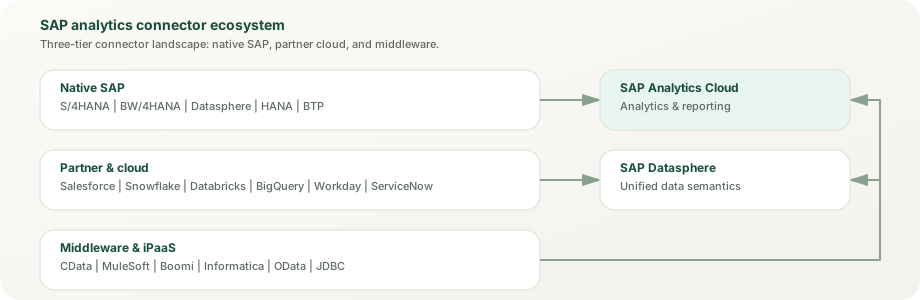
The connector ecosystem spans three tiers: native SAP connectors, partner and cloud connectors, and middleware platforms. Each tier serves different integration patterns and use cases.
SAP Business Data Cloud Connect for Databricks, Snowflake, and Google BigQuery (generally available), with Microsoft Fabric in public preview and Amazon Athena planned. Zero-copy architecture, implementation guidance, and decision frameworks.
Pipeline, account, campaign, and service data flowing from Salesforce into SAP analytics. Integration methods, semantic alignment, and business scenarios.
Workday, ServiceNow, Jira, Microsoft Teams, Slack, Shopify, Magento, SAP Ariba, SAP Concur, and SAP Fieldglass. HR, ITSM, collaboration, and e-commerce patterns.
Balanced platform comparisons covering deployment, capabilities, pricing, governance, and coexistence patterns for mixed landscapes.
Boundary clarity
How integrations differ from adjacent topics
Integration work overlaps with other disciplines, but it should not become a vague label for every hard architecture discussion in a mixed landscape.
Not the semantic layer
SAP Datasphere is where shared business meaning is modeled and governed. Integration carries source context across boundaries, but it should not hide unresolved semantic design.
Not the dashboard layer
SAP Analytics Cloud turns trusted data into planning, analysis, and decision experiences. It should consume a disciplined integration route, not compensate for a weak one.
Not platform extension by default
SAP BTP for Analytics becomes relevant when runtime behavior, workflow, or application logic is required beyond standard integration and semantic handoffs.
Not a governance substitute
Governance / Security / Admin defines who controls permissions, stewardship, release, monitoring, and trust recovery around the integrated landscape.
Common misconceptions
Myths about non-SAP integration in SAP analytics
Teams often misunderstand what integration requires, how to measure success, and which problems integration can actually solve. These myths lead to wasted effort and broken trust.
Myth: Non-SAP data is harder to integrate than SAP data
Reality: Difficulty varies by system role and semantic clarity, not by SAP-versus-non-SAP vendor labels. A Snowflake connection with clear ownership and well-defined semantics can be simpler and more trustworthy than a BW connection with fragmented meaning. The real challenge is ownership and semantic control, not the system family.
Myth: Adding a connector solves the integration problem
Reality: Connectivity is the smallest part of integration work. The hard parts are mapping business meaning across systems, defining refresh or event patterns, owning the handoff when something breaks, and updating catalog and governance records to reflect the cross-platform flow. A connector just moves data; integration moves trust.
Myth: Real-time access is always better than replication
Reality: Real-time movement increases latency risk and ownership complexity without always improving business outcomes. Planned replication often fits better than live federation when teams need auditability, historical context, or the ability to recover from upstream changes. Choose the pattern based on the use case, not on the speed of the technology.
Myth: If Salesforce has the data, we do not need SAP semantics
Reality: Just because data originates in Salesforce does not mean Salesforce owns its semantic meaning when used in SAP analytics. SAP Analytics Cloud still needs clear definitions of stages, amounts, dates, and ownership hierarchies. Integration carries data; semantic control keeps it trustworthy after arrival.
Myth: Integrations are a one-time setup task
Reality: Integrations require ongoing stewardship. Data models change, business definitions evolve, connectivity patterns drift, and systems get upgraded. The strongest integration architectures are designed to be monitored and refreshed continuously, not set and forgotten.
Decision guide
How to decide whether integration is the real root problem
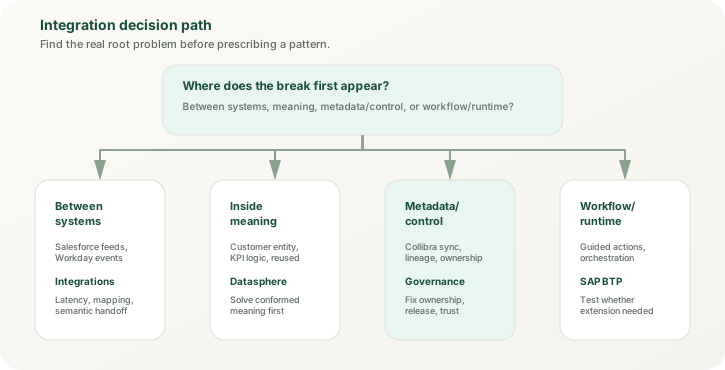
Use the decision path to avoid blaming integration for issues that actually start in semantics, governance, or platform-runtime design.
Integration is the right lens when the break appears between SAP and non-SAP systems or across ownership boundaries, not when the design failure lives fully inside another layer.
Choose Datasphere first
If Salesforce stages, Workday entities, or external-platform facts all mean different things after the handoff, solve the semantic problem before adding more movement.
Choose BTP first
If the use case needs custom action apps, workflow orchestration, approval routing, or governed runtime behavior, the center of gravity may sit in extension design rather than integration alone.
Choose Governance first
If catalog ownership, release checks, stewardship, or access controls are unclear across SAP and non-SAP tools, fix the control model before scaling the integration estate.
Official reference routes
Validate the pattern with primary sources before you publish implementation detail
The architecture guidance on this site is original. The platform baseline below comes first from official SAP product, help, and learning material re-checked in November 2026, then from vendor documentation only where a non-SAP handoff needs platform-specific detail.
Cross-platform analytics looks different depending on whether you operate it, model it, govern it, or fund it. The page should make that explicit instead of collapsing everyone into one technical story.
Beginner
Learn that Salesforce, Collibra, Snowflake, Workday, and ServiceNow do not all enter SAP analytics in the same way, even when they all look like "integration."
Practitioner
Inspect where definitions, refresh timing, metadata synchronization, and workflow context break as non-SAP information moves into analytics.
Architect
Design handoff ownership, semantic checkpoints, and control boundaries that keep SAP plus non-SAP landscapes understandable and supportable.
Decision-maker
Invest in the integration path when business decisions depend on cross-platform context and when weak handoffs would otherwise create recurring trust debt.
Real-world scenarios
How organizations use SAP Integrations in practice
Integrations create value when they establish trusted handoffs across platform boundaries. These scenarios are composites of common project patterns, not named client cases; they show how organizations move non-SAP data into SAP analytics without losing meaning or control.
B2B Technology
Revenue Intelligence: Salesforce + S/4HANA
A B2B software vendor was comparing Salesforce opportunity amounts with SAP invoice amounts to track deal progression. Manual reconciliation revealed a large discrepancy that nobody could explain.
Integrated Salesforce opportunity pipeline with SAP revenue through Datasphere semantic alignment. The double-counting was found and corrected.
Financial Services
Multi-Cloud Analytics
Risk reporting required data from SAP (portfolios), Salesforce (customer information), and ServiceNow (incidents). Reports were T+3 because each system had its own refresh schedule and the reconciliation happened offline.
Event-driven integration aligned refresh timing across all sources. Risk reporting became faster, with real-time escalation of high-impact items.
D2C Retail
Shopify Order-to-Cash
A direct-to-consumer brand was analyzing profitability at the SKU level but could not identify the lowest-margin products because Shopify and SAP were not connected. Margins were calculated in spreadsheets.
Integrated Shopify order and customer data with SAP product costs through Datasphere. Identified the lowest-margin products and changed strategy, recovering margin.
Once integration is treated as a trust discipline, the next design task is usually to tighten semantic ownership, control ownership, or the runtime boundary around action.
Sapphire 2026 update. SAP Sapphire 2026 extended zero-copy data sharing with SAP BDC Connect for Amazon Athena (query SAP data products across Amazon Bedrock, QuickSight, and SageMaker without replication; general availability planned for H1 2027), joining Databricks, Snowflake, and Google BigQuery (generally available) and Microsoft Fabric (public preview). SAP also leaned on open agent standards (MCP and A2A) and Google Cloud / Microsoft agent-to-agent interoperability. Read the full analytics-lens analysis →