Separate cross-system handoffs from broader runtime behavior. Integration exists to preserve context across platforms. Extension exists to create new governed behavior around the analytics experience.
Boundary decision page
Separate integration from platform extension before a mixed SAP landscape grows unnecessary runtime complexity.
In SAP analytics programs, teams often treat every Salesforce feed, Collibra synchronization, Snowflake pipeline, Databricks output, Workday event, or ServiceNow workflow as a reason to expand the platform-runtime footprint. That is usually the wrong move. In 2026, this mistake is compounded by new capabilities: event-driven integration (now a mainstream default for real-time patterns), BDC Connect zero-copy sharing with Snowflake, Databricks, and (since July 2026) Google BigQuery, and Joule agents that can traverse integration boundaries without custom extension code. Most mixed-landscape needs begin as integration, semantic, or governance problems. Platform extension becomes justified only when the analytics estate truly needs custom workflow, application behavior, or governed runtime orchestration beyond standard handoffs. The distinction between these two—and the frameworks to test them—separates sustainable architecture from drift.
How to use this page:
First identify what the non-SAP system is contributing. If the need is connection, data movement, event flow, or metadata synchronization, stay in integration thinking. If the need is custom action logic, user-facing workflow, or application behavior around analytics, test whether extension is really justified. Then apply the boundary checks to validate that the runtime cost is worth the use case.
View the visual decision
Read the ecosystem tests
Run the boundary checks
Open the official references
Teams collapse APIs, data movement, orchestration, and custom workflow into one delivery stream, then build more platform surface than the use case actually requires. The Keep the Core Clean principle—preserve system of record integrity—gets abandoned for convenience.
The wrong boundary decision changes cost, operating ownership, control requirements, support effort, and long-term maintainability across the whole analytics estate. Poor boundaries also make future platforms hard to add.
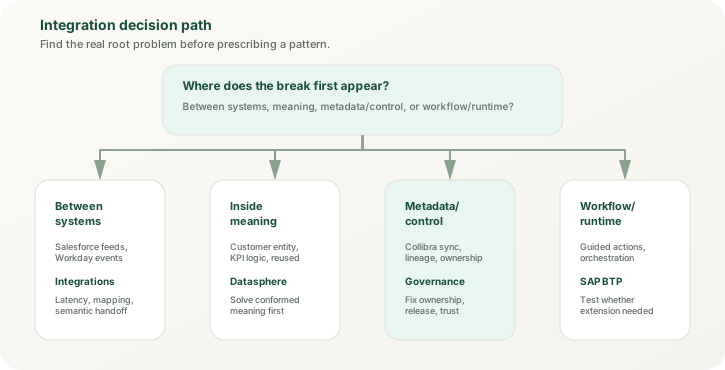
Visual decision framework
Integration technologies vs extension platforms at a glance
SAP's modern architecture layers these two patterns clearly. Integration Suite handles the cross-system plumbing. BTP handles the custom behavior layer. Knowing which tools belong in each lane prevents scope creep and support confusion.
The SAP Integration Suite (Cloud Integration (formerly CPI), API Management, Event Mesh) handles the first layer. These tools specialize in reliable movement, schema transformation, and event distribution. Event Mesh is a strong 2026 pattern choice for real-time event distribution; if you are routing data through Cloud Integration when Event Mesh fits, you are overcomplicating. SAP Business Data Cloud (BDC) Connect adds zero-copy sharing with Snowflake, Databricks, and Google BigQuery—if your integration need is simply making SAP semantics available to cloud data platforms, BDC often solves it without Cloud Integration at all. SAP BTP extension frameworks (Cloud Foundry, Kyma, SAP Build, Joule agents) handle custom logic that depends on that clean handoff. Agents built in Joule Studio, part of SAP Build (agent builder GA since December 2025), can act across systems through low-code skills; try them before writing custom BTP code. The mistake most teams make is conflating these two lanes or building extension logic to compensate for weak integration design.
Ecosystem tests
Read common non-SAP ecosystems correctly before choosing SAP BTP extension
Most boundary confusion disappears when the external system is classified by role. These examples reflect what strong SAP analytics architecture usually does in practice. The pattern matters more than the specific product.
Usually integration first
Salesforce and CRM platforms
Most CRM use cases begin as integration: commercial context, customer state, activities, or service signals feeding SAP analytics. The Integration Suite routes these feeds with governance and versioning: in Cloud Integration, the SAP Salesforce adapter calls Salesforce APIs, and the Salesforce Pub/Sub adapter carries platform events and change data capture. Extension becomes relevant only when the analytics program also needs custom action apps (e.g., approval workflows triggered by dashboard insights), workflow routing, or in-platform task handling around those signals. If you are just ingesting CRM data, you do not need BTP custom code yet.
Usually governance plus integration
Collibra and catalog platforms
Catalog synchronization, lineage visibility, and stewardship workflows are not, by themselves, reasons for a broad analytics runtime extension layer. The first question is whether metadata and ownership can be synchronized cleanly via APIs before new application behavior is added. Collibra's SAP Datasphere integration, which synchronizes catalog metadata (tables, views, columns, models) from Datasphere into Collibra and in its 2026 versions also covers SAP Analytics Cloud and SAP data products, solves most of these needs. Extension enters only when the analytics team needs to build guided stewardship apps or approval chains around analytics assets themselves.
Usually BDC Connect, not extension
Snowflake and Databricks
Large-scale external platforms often supply engineered data, machine-learning outputs, or shared enterprise pipelines. That does not automatically justify extension. New in 2026: BDC Connect shares SAP-managed and custom data products zero-copy in both directions with Databricks (GA since October 2025), Snowflake (GA since May 2026), and Google BigQuery (GA since July 2026). No ETL and no sync lag, though a BDC subscription is required and inter-region data transfer and processing requests are metered in capacity units. This solves the "data scientists need SAP data without maintenance" problem entirely within integration scope, not extension. Integration Suite (for example, its Snowflake adapter) can also pull from these platforms for analytics enrichment. The first boundary question is where business meaning becomes stable for SAP consumption—that is a semantic and governance question (Datasphere), not an extension one. If your data science team needs governed SAP metrics for ML model training, that is BDC Connect + Datasphere, not extension. Extension might apply if you need custom apps to manage Snowflake consumption governance, create approval workflows around ML outputs, or surface ML predictions in SAP-native UI—those are workflow/UI needs, not data needs.
Sometimes extension later
Workday and ServiceNow
Workforce and service systems often start as integration plus event or state handling. The Integration Suite, with its Workday and ServiceNow adapters, ingests payroll, staffing, or incident data. Extension becomes appropriate only when the analytics experience must also own custom approvals, escalation logic, or guided operational responses (e.g., an SAP Build Process Automation workflow that routes analytics-driven recommendations back to ServiceNow). Pure data movement does not justify extension overhead.
Boundary checks
Run these tests before you widen the platform-runtime surface
The simplest architecture that preserves trust usually wins. These checks help teams resist the temptation to use extension language before they have solved the real handoff problem. Apply them in order; if any check fails, you likely do not need extension yet.
Check 1
Is the missing capability really movement or runtime behavior?
If the need is data transfer, API exchange, event handling, or metadata synchronization, start with integration. Do not build application behavior to mask a weak handoff design. The Integration Suite exists to solve these problems. If you are considering extension because integration feels slow or complex, the answer is to redesign the integration, not to add extension logic.
Check 2
Can the problem be solved by semantics and control first?
If the confusion is really about metric logic, source authority, or stewardship, solve that before expanding the runtime surface. Extension will not fix a semantic argument you have not resolved. Assign ownership, define the semantic layer, synchronize lineage. Do this work in Datasphere or via catalog platforms before considering custom apps around the data.
Check 3
Does the use case need new human workflow around analytics?
Custom approvals, guided task routing, action apps, or policy-driven process steps may justify extension. Passive data delivery into dashboards usually does not. If the outcome is just "data available in the system," you are done with integration. If the outcome is "person A approves, then triggers action B," now you may need SAP Build or custom Kyma services.
Check 4
Can the team support the added operating surface?
Extension creates new lifecycle, security, monitoring, and support duties. If no one is prepared to own them, the architecture has not earned the extra platform footprint yet. Estimate the ops cost: monitoring, updates, incident response, code maintenance. If that cost exceeds the use-case value, keep it in integration and simplify instead.
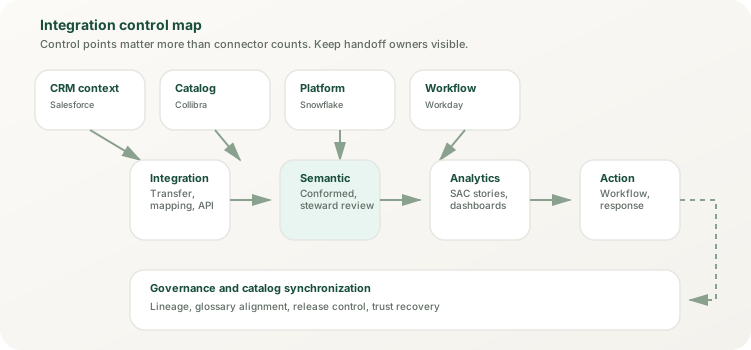
Typical outcomes
Most design decisions land in one of these four outcome patterns
Not every architecture decision needs a custom platform build. In mixed landscapes, these are the outcomes that show up most often when the problem is framed honestly. Choose the simplest outcome that fits your actual requirement.
Outcome 1
Integration only
The use case only needs reliable movement, mapping, and ownership across systems. No new runtime behavior is required around the analytics surface. Example (composite pattern): A retailer moves Salesforce customer activity through Cloud Integration (the SAP Salesforce adapter for API reads, the Salesforce Pub/Sub adapter for change events) into a Datasphere Open SQL schema over JDBC, models it in Datasphere (semantic ownership), and surfaces it in SAC dashboards. No custom apps, no extension runtime. Cloud Integration + Datasphere = integration complete.
Outcome 2
Integration plus semantic checkpoint
The handoff is not enough by itself. External data needs a governed business-semantic layer (usually in Datasphere) before SAP Analytics Cloud should consume it widely. Example (2026 data science pattern): Snowflake ML model output (churn prediction scores) is shared back to SAP Business Data Cloud through BDC Connect, zero-copy, and consumed in Datasphere, which wraps it in a governed analytic model. Data scientists access churn predictions directly in Snowflake; business users access them via SAC; other teams consume them as a governed data product. One semantic owner, many consumption patterns.
Outcome 3
Integration plus catalog synchronization
The estate needs stronger lineage, stewardship, or asset documentation alongside the business-semantic layer, but still does not need custom application runtime. Example (regulated organization, composite): Stewards own dimension hierarchies in SAP Reltio or SAP MDG; the governed records feed Datasphere dimensions and the DAC permissions entity; Collibra synchronizes the Datasphere catalog metadata for enterprise-wide lineage and stewardship. Audit evidence stays in each system's logs and is documented end to end. No new extension code needed to manage the governance conversation.
Outcome 4
Integration plus bounded extension
The use case truly needs custom action logic, workflow orchestration, or application behavior around analytics. Extension is justified, but only after the handoff and semantic layers are already clear. Example (finance center use case): Datasphere models plan vs. actual, and SAC surfaces the comparison. An SAP Build Process Automation workflow routes anomaly-flagged cost centers to finance controllers for approval and posts approved corrections back to S/4HANA through its APIs. Integration owns data movement (Cloud Integration); Datasphere owns semantics; SAP Build owns workflow. Clear boundaries, clear ownership.
BTP extension patterns
When extension is appropriate, choose the right pattern
SAP BTP offers multiple extension patterns. Understanding which fits your use case prevents over-engineering and keeps operating costs down. The pattern choice should come after boundary clarity, not before.
Side-by-side extensions
Cloud Foundry and Kyma
Custom services that run alongside SAP systems, consuming clean data from Integration Suite. Good for: custom analytics workflows, recommendation apps, approval chains, orchestration logic that orchestrates around (not modifies) SAP data. These do not modify the core system; they add value in a separate runtime.
Embedded extensions
In-app extensibility
Custom code, workflows, or rules embedded in SAP Analytics Cloud, Datasphere, or other SAP products. Good for: formula customization, calculated fields, dynamic row-level security, governed customization that stays within the product. Lower ops cost than side-by-side, but less flexibility.
Low-code apps
SAP Build Apps, Process Automation, and Work Zone
Citizen-developer or guided-process apps for workflow, approvals, or data curation. Good for: governance workflows, analytics-driven actions, stewardship tasks, approval routing. Faster to build and change than code, but still requires platform governance.
Custom ABAP
SAP BTP, ABAP environment (ABAP Cloud)
For teams with deep ABAP expertise who need to extend ABAP-based SAP systems (BW, S/4HANA). Most analytics teams should prefer Cloud Foundry or SAP Build. ABAP extensions carry higher complexity and support cost.
Official reference lane
Validate the product baseline with current primary sources
The architecture judgment on this page is original. The product and platform baseline below comes from official SAP and vendor sources reviewed in November 2026. These references validate both integration and extension tooling discussed above.
SAP runtime and integration
Use SAP sources to test the boundary
External platform references
Use vendor docs for the external-system edge cases
Adjacent site routes
Use the related pages when the boundary still needs context
Scope note
This page exists to clarify the boundary, not to prescribe every implementation path
Its job is to reduce misframing before teams build complexity into the system. The implementation pattern should be chosen only after the boundary judgment is clean. The decision is: integration, semantics, governance, or extension? Once that is settled, the specific tool choice (Cloud Integration vs. Cloud Foundry vs. SAP Build) becomes easier.
Where next