SAP Integration Suite and Middleware for Analytics
Integration middleware is the backbone of enterprise data movement. SAP Integration Suite is SAP's native iPaaS platform, while third-party solutions like MuleSoft, Boomi, and Informatica offer compelling alternatives. 2026 patterns emphasize event-driven architectures (Event Mesh, advanced event mesh), AI-assisted integration (generating integration flows from natural-language prompts), and managed connectors (Open Connectors offers over 160 prebuilt connectors). Learn when to use each, and how to architect integration patterns that power real-time analytics.
Middleware Landscape Overview
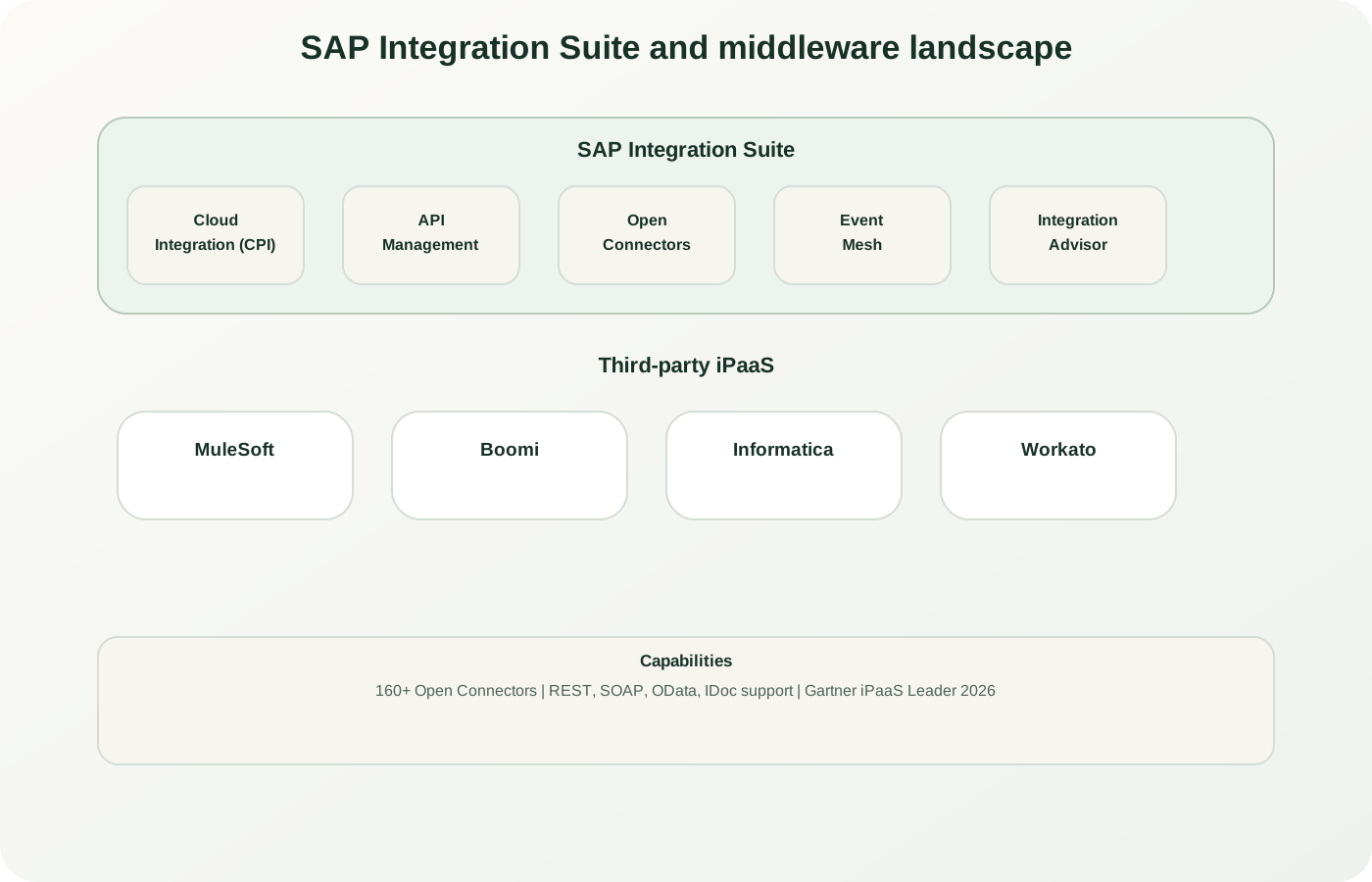
Middleware landscape: Cloud Integration (CPI) for iFlows, Event Mesh for async patterns, API Management for governance, plus third-party options (MuleSoft, Boomi, Informatica). Open Connectors provide a unified REST abstraction across 160+ SaaS apps.
SAP Integration Suite Deep Dive
SAP Integration Suite is SAP's unified, cloud-native integration platform-as-a-service (iPaaS). It consolidates multiple integration capabilities under one umbrella, reducing licensing complexity and improving operational efficiency. Most importantly for analytics workloads, Integration Suite provides the pipes needed to move data reliably from SAP and non-SAP sources into your analytics platforms.
Cloud Integration (CPI)
The heart of Integration Suite is Cloud Integration, a visual iFlow-based platform supporting synchronous and asynchronous integration patterns.
- Adapters: HTTP, SOAP, OData, IDoc, RFC, SFTP, JMS, JDBC, Kafka, AMQP, and more, plus prebuilt integration packages in SAP Business Accelerator Hub
- iFlow Designer: Drag-and-drop routing, transformation, and conditional logic
- Mapping: Graphical message mapping, XSLT mapping, and Groovy or JavaScript scripts
- Monitoring: Real-time message tracking and error handling
Recent additions: Generation of integration flows with preconfigured connectors from natural-language prompts (a premium AI offering for the enhanced and premium editions, free of charge until December 31, 2026) and an AI adapter for connecting integrations to large language models.
API Management
Design, govern, and monetize APIs with enterprise-grade security and analytics.
- API Design: OpenAPI/Swagger specification support
- Security: OAuth2, JWT, SAML, mutual TLS, and API key authentication
- Rate Limiting & Throttling: Per-tier quota management and spike arrest
- Developer Hub: Self-service API discovery and documentation (formerly API business hub enterprise)
- Analytics: API traffic, latency, and error metrics
Why it matters: Critical for controlling access to analytics data APIs and enforcing governance across consumer teams.
Open Connectors
Pre-integrated connectors to over 160 third-party cloud applications. Open Connectors launched in 2018 on the Cloud Elements connector catalog.
- Unified REST Interface: Consistent API across all connectors
- No-Code Integration: Map objects and fields without code
- Coverage: Salesforce, Workday, HubSpot, NetSuite, Zendesk, Shopify, ServiceNow, and more
- Transformation: Data shape translation on the fly
- Field Normalization: Standardize naming and format across connectors
Note: Open Connectors ships over 160 prebuilt connectors with a unified REST interface, simplifying integration of SaaS data sources with SAP systems and analytics platforms.
Event Mesh & Event-Driven Architecture
Real-time, event-driven integration for modern analytics and microservices patterns.
- Real-Time Event Streaming: multi-protocol publish-subscribe (AMQP, MQTT, REST); Advanced Event Mesh adds Solace-based brokering with Kafka bridging
- Event Transformation: Content-based routing and filtering
- Guaranteed Delivery: At-least-once semantics with dead-letter queues
- Event Replay: Advanced event mesh can replay stored events to recover or onboard subscribers
- Async Patterns: Decouple producers and consumers for scalability
For analytics: Useful where analytics needs continuous refresh. Datasphere does not subscribe to topics itself, so a subscriber (an iFlow or a CAP service) writes the events into it.
Integration Advisor
SAP's design-time capability for B2B, A2A, and B2G content: it creates message implementation guidelines (MIGs) and mapping guidelines (MAGs) from a library of industry standards, proposes mappings with a crowd-based machine-learning service, and generates runtime artifacts for Cloud Integration. Particularly valuable for enterprises with complex B2B trading networks.
Market Leadership
SAP was named a Leader in the 2026 Gartner Magic Quadrant for Integration Platform as a Service (published March 16, 2026), its sixth consecutive recognition. Read the Gartner report itself for the assessment behind the placement.
Integration Architecture for Analytics
A modern integration stack: SAP sources, middleware platforms, and target analytics systems.
The diagram above illustrates a typical enterprise analytics integration architecture. SAP systems (ERP, C4C, SuccessFactors, Analytics Cloud) are integrated through middleware (either SAP Integration Suite or a third-party iPaaS) to populate data warehouses, data lakes, and analytics platforms. Event Mesh enables real-time, event-driven refresh patterns.
Key architectural considerations for analytics integration:
- Data Volume & Latency: Does your analytics refresh cycle require hourly syncs, daily batch, or real-time streaming? This determines whether scheduled iFlows or Event Mesh is more appropriate.
- Master Data vs. Transaction Data: Master data (cost centers, products, customers) often follows centralized hub-and-spoke patterns; transaction data (sales orders, receipts) may use star topology or log-based change capture.
- Security & Compliance: Encryption in transit, data masking, audit logging, and role-based access control must be enforced at the middleware layer.
- Scalability & Performance: Monitor message throughput, end-to-end latency, and error rates, and optimize or refactor oversized integrations before adding capacity.
Third-Party iPaaS Platforms
While SAP Integration Suite is the native choice, leading enterprises often run multi-platform integration portfolios. Here's a detailed look at the key contenders:
MuleSoft (Salesforce Anypoint Platform)
Strengths:
- API-led integration architecture; industry-leading governance
- Prebuilt SAP connectors (SAP ERP and S/4HANA via IDoc or BAPI over RFC, S/4HANA OData and SOAP APIs, SuccessFactors, Concur)
- Excellent for multi-cloud, multi-vendor landscapes
- Strong developer community and Salesforce ecosystem
- Advanced analytics on API traffic and integration health
Consider if: Your enterprise is Salesforce-centric, requires strict API governance, or operates a large, complex integration portfolio.
Typical Use: API-mediated access to SAP systems from Salesforce and other SaaS apps; analytics data access via REST APIs.
Boomi (formerly Dell Boomi / AtomSphere)
Strengths:
- Extremely user-friendly visual interface; low barrier to entry
- Fast time-to-value for non-technical integrators
- Robust SAP adapter library with broad pre-built connectors
- Workflow automation and document handling
- Atom cloud for edge/hybrid deployment
Consider if: Your team favors low-code/no-code tools, or you need rapid integration deployment without heavy development overhead.
Typical Use: Master data synchronization (MDM), order-to-cash workflows, and cross-system event propagation.
Informatica (part of Salesforce since November 2025)
Strengths:
- Enterprise data quality and AI-powered data management (CLAIRE AI engine)
- AI-assisted schema mapping and pattern detection
- SAP connectivity for extraction and loading (check SAP Note 3255746 before relying on ODP-based extraction)
- Master data management and data governance tools
- Strong in data-centric organizations
Consider if: Your analytics initiative requires data quality, master data governance, or intelligent schema inference.
Typical Use: Data consolidation from multiple SAP instances, customer master data integration, and data quality assurance before analytics.
Workato
Strengths:
- Large connector library; rapid innovation cadence
- Business-user-friendly recipes and workflow automation
- Strong in SMB to mid-market; rapid onboarding
- RPA and workflow automation built-in
- Suits teams that want integration and automation in one tool
Consider if: You need broad SaaS coverage, business-user empowerment, or combined integration + RPA.
Typical Use: Cross-cloud business process automation; integration of niche SaaS apps with core enterprise systems.
Celigo
Strengths:
- Specialized in e-commerce integrations (Shopify, BigCommerce, WooCommerce)
- Prebuilt integrations such as Shopify–SAP Business ByDesign and Shopify–NetSuite
- integrator.io iPaaS with prebuilt Integration Apps and templates
- Strong in mid-market retail and CPG
- Fast deployment for standard e-commerce flows
Consider if: Your analytics initiative involves e-commerce platforms or you require specialized retail/CPG integration accelerators.
Typical Use: Shopify-to-SAP order sync; inventory and financial analytics from multi-channel retail.
SAP Integration Suite vs. Third-Party: Decision Framework
Choosing between SAP Integration Suite and third-party iPaaS is not binary—many enterprises run multiple platforms in parallel. Here's a framework to guide your decision:
| Scenario | Recommended Platform | Rationale |
|---|---|---|
| SAP-Centric Landscape ERP + Analytics Cloud + C4C + SuccessFactors |
SAP Integration Suite | Native connectors, single license agreement, SAP support, integrated governance. |
| Multi-Vendor / Cloud-Native 50% SAP, 50% non-SAP systems |
Third-Party iPaaS (MuleSoft or Informatica) |
Broader connector ecosystem, language/platform agnostic, proven in heterogeneous environments. |
| Already Invested in MuleSoft / Boomi Active integration platform in use |
Extend Existing Platform | Leverage existing skills, governance, and investment. Purchase SAP connectors; avoid dual-platform overhead. |
| Event-Driven SAP Analytics Real-time order, invoice, or inventory events |
SAP Integration Suite (Event Mesh) | Event Mesh is tightly integrated with S/4HANA; lower latency than polling via third-party. |
| Data Quality & Master Data Governance Complex consolidation from multiple SAP instances |
Informatica | Informatica's data quality and master data management tools are strong for consolidation; check its SAP extraction method against SAP Note 3255746. |
| Business-User-Driven Automation Cross-functional workflow integration (no IT needed) |
Workato or Boomi | Low-code UX, business user empowerment, faster deployment cycle. |
| E-Commerce + SAP Analytics Shopify, BigCommerce, or custom storefront |
Celigo (with SAP connectors) or third-party | Celigo has pre-built accelerators; alternative: MuleSoft or Boomi with strong e-commerce connector packs. |
Key Considerations
- Cost Model: SAP Integration Suite is licensed under your SAP contract (BTPEA, CPEA, pay-as-you-go, or subscription editions); third-party platforms use their own metrics (connectors, flows, messages, or API calls). Model your actual workload before comparing.
- Skill Set & Staffing: SAP Integration Suite draws on SAP integration skills (Cloud Integration, Groovy, SAP adapters); MuleSoft, Boomi, and Informatica have broader talent pools.
- Governance & Compliance: Integration Suite is integrated with SAP's security ecosystem (SAP Cloud Identity Services); third-party platforms offer robust but separate governance models.
- Support & SLAs: SAP Integration Suite is supported under your SAP support agreement; third-party vendors each have their own support structures.
- Roadmap Alignment: If your organization is committed to SAP cloud (BTP, Analytics Cloud, S/4HANA Cloud), Integration Suite naturally aligns; if you're cloud-agnostic, third-party is often more flexible.
CData and the Connector Ecosystem
CData Software sells drivers and connectors for a wide range of SaaS applications, databases, and APIs, and its tools appear in many integration and analytics stacks. SAP Open Connectors has its own origin: it launched in 2018 on the Cloud Elements connector catalog.
CData's Role in SAP Analytics
In SAP analytics landscapes, treat CData as one of several third-party options for drivers and replication, alongside SAP's own connectivity.
CData Sync is a related offering that enables zero-code, scheduled replication of cloud data into data warehouses (Snowflake, BigQuery, Redshift, Azure Synapse) and data lakes (S3, Azure Data Lake). For analytics teams, CData Sync can be faster to implement than custom iFlows; for SAP ABAP sources, confirm that the extraction method is permitted (SAP Note 3255746 restricts third-party use of the ODP-RFC replication API).
Enterprise MCP and AI-Driven Integration (2026 Trend)
A significant 2026 trend is the adoption of Model Context Protocol (MCP) in enterprise integration. MCP lets large language models (LLMs) and AI agents call tools and data sources through a standard interface. On the SAP side, SAP AI Agent Hub (generally available since May 2026) registers and governs agents and MCP servers, and SAP Enterprise AI Gateway, built on SAP Integration Suite, is planned for general availability in Q1 2027.
Use cases emerging in 2026:
- AI-Generated Integration Logic: "Create an integration that syncs all customers modified in the last 24 hours from Salesforce to our analytics warehouse." SAP Integration Suite already generates integration flows from prompts like this for developers to review and complete.
- Natural Language Data Queries: "What's the total revenue by region for Q1?" An AI agent uses MCP to query across integrated data sources without writing SQL.
- Automated Data Mapping: Integration Advisor already proposes B2B mappings with machine learning, and AI-assisted mapping is spreading across iPaaS tools.
- Predictive Integration Health: AI monitors integration latency, error rates, and throughput; proactively recommends optimization or scaling.
For organizations investing in AI-augmented analytics, ensuring your integration middleware supports MCP is increasingly important.
Implementation Patterns for Analytics
Modern analytics integration typically combines multiple patterns to balance latency, cost, and complexity:
1. Scheduled Replication via CPI / Middleware
Use Case: Daily or hourly syncs of transactional data from SAP ERP to a data warehouse for reporting and BI.
Pattern:
- iFlow triggers on a schedule (e.g., 2 AM UTC daily)
- Reads delta from SAP table (using a timestamp field or change tables)
- Transforms data to target schema (e.g., Snowflake format)
- Bulk inserts into warehouse; handles duplicates and conflicts
- Logs metrics and errors; alerts on failure
Tools: SAP Integration Suite (CPI), MuleSoft, Informatica, Boomi
2. API-Mediated Access
Use Case: Real-time analytics queries that hit SAP systems directly via REST APIs, or push analytics results back to SAP.
Pattern:
- Middleware exposes analytics-friendly REST APIs that abstract SAP backend complexity
- APIs include filtering, pagination, and aggregation to reduce payload
- Rate limiting and caching prevent backend overload
- OAuth2 governs access by analytics team or external consumer
Tools: SAP Integration Suite (API Management), MuleSoft, Apigee
3. Event-Driven Refresh
Use Case: Low-latency, continuous update of analytics dashboards based on real-time SAP events (e.g., sales orders, shipments, cost center changes).
Pattern:
- SAP publishes domain events (or emits change records) to Event Mesh / message broker
- A subscriber consumes the relevant topics (orders, invoices, etc.) and writes them to the analytics store; Datasphere does not subscribe to topics itself
- Transformation and enrichment happen in-stream or on ingest
- Warehouse upserts records in real-time; drives live dashboard refresh
Tools: SAP Integration Suite (Event Mesh), Kafka, AWS EventBridge + Lambda
4. Log-Based Change Capture (CDC)
Use Case: Continuous, low-impact replication from SAP databases without custom code.
Pattern:
- CDC tool (e.g., Informatica, Talend, Debezium) captures database logs or table changes
- Changes are streamed to a message broker or data lake in real-time
- Warehouse consumes the stream and applies updates (slowly changing dimensions, fact table inserts)
Tools: Informatica, Qlik (Talend), AWS DMS, Google Datastream. For SAP ABAP sources, check SAP Note 3255746 first: SAP does not permit customer or third-party use of the ODP-RFC replication API and points to SAP Business Data Cloud or the ODP-OData API instead.
5. Hybrid: Batch + Real-Time
Use Case: Large historical data loads run nightly; incremental real-time events refresh throughout the day.
Pattern:
- Scheduled batch job (midnight) extracts full tables or large datasets
- Real-time events (orders, changes) are captured via Event Mesh and applied immediately
- Reconciliation job ensures no gaps or duplicates
Best Practice: Use distinct storage (staging tables, Kafka topics) to separate batch and real-time flows until final merge in warehouse.
Common Misconceptions About Integration Middleware
1. "Integration Suite is Only for SAP-Only Shops"
False. Integration Suite includes Open Connectors to over 160 third-party apps, and CPI can transform and route data from any source. However, if you're multi-cloud and vendor-agnostic, third-party iPaaS may offer broader choice.
2. "Third-Party iPaaS Always Costs Less Than SAP Integration Suite"
False. Integration Suite costs depend on your SAP contract (BTPEA, CPEA, pay-as-you-go, or subscription editions), while third-party platforms price by connectors, flows, messages, or API calls; neither side is cheaper by default. Cost comparison requires modeling your actual workload.
3. "We Can Build Custom Integration Code Instead of Using Middleware"
Possible, but high-risk. Custom code lacks built-in monitoring, scaling, error recovery, and security controls that enterprise middleware provides. Maintenance burden grows as data volume and system complexity increase. Middleware is a business decision, not just a technical one.
4. "Event-Driven Integration Is Always Better Than Scheduled Batch"
Not necessarily. Event-driven requires more infrastructure (message brokers, event streaming), increased operational complexity, and careful design to prevent data loss. For analytics, batch integration (daily or hourly) is often simpler and sufficient. Choose based on latency SLA.
5. "Once I Pick a Platform (SAP Integration Suite or MuleSoft), I Can't Switch"
Flexible migration is possible. Well-designed integrations (clear APIs, modular flows, documented transformations) can be re-implemented on alternative platforms. Plan for portability from day one; avoid lock-in to platform-specific extensions.