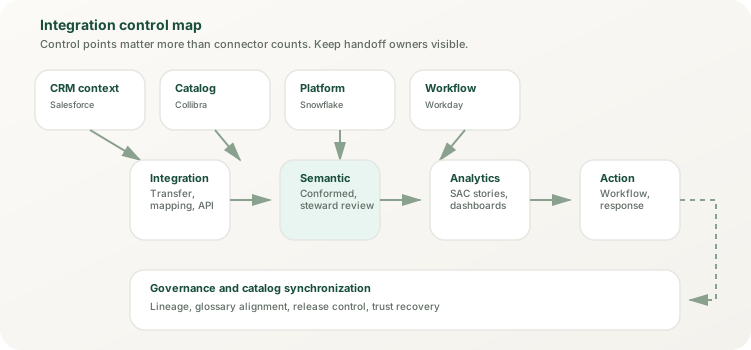
Salesforce feeds pipeline, account, service, and campaign reality. Collibra feeds lineage, stewardship, and metadata visibility. They should not be designed as if they are the same handoff.
Practical integration page
Design non-SAP integration patterns for SAP analytics by system role, not by connector excitement.
Mixed SAP landscapes only become manageable when teams stop treating every external platform as the same kind of integration problem. Salesforce contributes operational CRM context. Collibra contributes metadata, stewardship, and catalog context. Snowflake and Databricks contribute engineered data and advanced platform context. Workday and ServiceNow contribute workflow and operational-state context. SAP analytics becomes trustworthy when each of those roles is brought in through the right handoff, semantic checkpoint, and operating control.
How to use this page:
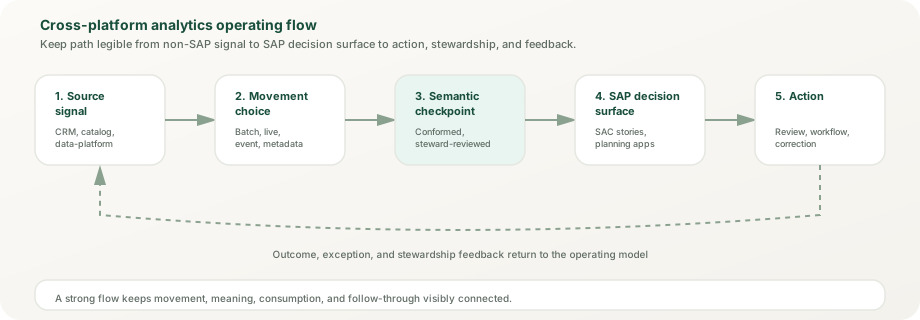
first classify the non-SAP platform by role. Then decide whether the use case needs replicated data, live access, metadata synchronization, or event handling. Only after that should you choose whether the solution remains an integration pattern or grows into platform extension.
Snowflake or Databricks can prepare or host data at scale, but SAP analytics still needs a clear place where business meaning becomes stable for consumption.
The goal is not to build the biggest integration estate. It is to preserve business meaning with the least fragile movement and the clearest operating ownership.
Pattern families
Use a different pattern for each external-system role
Most failed integration programs flatten distinct roles into one generic "pipeline." The better move is to preserve the job each system is already good at while making the handoff into SAP analytics explicit. This section details the four primary integration patterns with practical implementation context.
Pattern 1: API-based synchronous integration (request/response)
Use Case: On-demand or scheduled data retrieval from Salesforce, ServiceNow, Workday, and other SaaS platforms with RESTful APIs.
Architecture: SAP Cloud Integration (the CPI engine within SAP Integration Suite) hosts iFlows that invoke third-party REST APIs, transform responses, and write the results into Datasphere, typically through the JDBC adapter into a database user's Open SQL schema, from which tables are imported into Datasphere models. Calls are synchronous (request → response) and typically scheduled (nightly, hourly, or triggered by events).
Advantages:
- Simple to implement. Most SaaS platforms expose REST or OData APIs; no custom middleware needed.
- Mature Integration Suite features: exception handling, retry patterns (for example through JMS queues), mappings, and Groovy or JavaScript scripts for transformation.
- Tight control over data movement. Easy to add validation, deduplication, and data quality gates.
- Cost-effective for moderate data volumes and delta loads.
Challenges:
- Rate limiting. SaaS APIs enforce request allocations (Salesforce, for example, counts API requests over a rolling 24 hours). Large datasets require pagination, bulk APIs, and careful scheduling.
- Latency. Scheduled API calls mean data freshness is bounded by call frequency (nightly = 24-hour lag, hourly = 60-minute lag).
- Operational overhead. Each iFlow must be monitored, maintained, and updated when upstream APIs change (Salesforce API versions, Workday API deprecation).
Implementation Pattern:
- 1. Design iFlow: CPI iFlow calls Salesforce REST API, filters for modified records since last run (delta load), and transforms JSON response to Datasphere table schema.
- 2. Schedule: Run in an off-peak window (for example nightly). For large volumes, use Salesforce Bulk API 2.0 rather than record-by-record REST calls.
- 3. Error Handling: Failed calls trigger email alert, log to dead-letter queue, and auto-retry 3x with exponential backoff.
- 4. Data Quality: Validation views or checks in Datasphere flag missing required fields, out-of-range values, and duplicates before the data reaches business models.
- 5. Monitoring: Cloud Integration message monitoring (or SAP Cloud ALM Integration & Exception Monitoring) tracks failures; a health view tracks record counts, run duration, and freshness in Datasphere.
Example (Salesforce Opportunities → SAC Performance Analytics): A nightly iFlow pulls all opportunities modified in the last 24 hours, maps Salesforce fields (Name, Amount, StageName, CloseDate, Owner.Name) to a Datasphere opportunity table, and writes the records through the Open SQL schema. An SAC story on a live connection to Datasphere shows pipeline by stage, probability-weighted forecast, and closed won/lost trends. Latency: up to 24 hours from Salesforce update to dashboard visibility.
Pattern 2: Event-driven asynchronous integration (pub/sub)
Use Case: Frequent, time-sensitive updates from transactional systems (SAP S/4HANA business events, Salesforce platform events, or commerce webhooks relayed by an integration flow). Events go to an event broker (the Event Mesh capability of SAP Integration Suite, or advanced event mesh for high volumes); subscribers consume them asynchronously.
Architecture: Source systems publish events (for example OrderCreated, OrderShipped, or ExpenseApproved) to broker topics, and queues subscribe to those topics. Datasphere does not subscribe to topics itself: a subscriber, typically a Cloud Integration iFlow with the AMQP adapter or a small CAP service, consumes the queue and writes upserts into a Datasphere table. SAC stories on a live connection to Datasphere show the new state on their next refresh.
Advantages:
- Timeliness. Events reach the broker as they happen, so analytics can update in near real-time instead of waiting for a batch window.
- Decoupled systems. Source systems don't need to know about analytics subscribers. New subscribers (reports, workflows) can join topics without source changes.
- Fan-out. Several subscribers can consume the same event independently through their own queues; advanced event mesh is the option for high volumes and distributed, multi-broker meshes.
- Resilience. Guaranteed messages wait in queues while a subscriber or the target is unavailable, and the subscriber catches up afterwards (within the queue's storage limits).
Challenges:
- Operational complexity. Event schema versioning, queue and subscription management, and dead-letter handling require careful design.
- Cost. The event broker and the subscriber runtime add licensing or consumption costs that a batch design avoids.
- Eventual consistency. Guaranteed delivery is at least once, so duplicates can arrive; subscribers must upsert by business key to stay idempotent.
- Debugging difficulty. Tracing event flows across multiple systems and topics is harder than point-to-point APIs.
Implementation Pattern:
- 1. Define Topics and Queues: Use topics such as PurchaseOrder.Created and PurchaseOrder.Changed, subscribe a queue to them, and agree the payload schema (for example JSON) with the source owners.
- 2. Set Up Source Emitters: Configure the source to publish when milestones occur (creation, change, approval): for example SAP S/4HANA business events, or an integration flow that relays SaaS webhooks.
- 3. Configure the Subscriber: A Cloud Integration iFlow consumes the queue, upserts records by PO ID into a Datasphere table through a database user's Open SQL schema, and routes failures to a dead-letter queue.
- 4. SAC Story: A story on a live connection to Datasphere shows PO volume, value, and approval-state metrics; set the refresh frequency by the decision it serves.
- 5. Monitoring & Alerting: Watch queue depth and failed messages (Cloud Integration monitoring or SAP Cloud ALM) and alert when the backlog exceeds the agreed freshness window.
Example (Purchase Orders → Near Real-Time Spend View): When a purchase order changes in SAP S/4HANA, a business event is published to the broker. A Cloud Integration iFlow consumes it from the queue and upserts the PO record in Datasphere, and the SAC story shows it on its next refresh. Latency: near real-time; the end-to-end target depends on subscriber design and refresh settings.
Pattern 3: Zero-copy (BDC Connect) for large data platform integration
Use Case: Integrating Snowflake, Databricks, or Google BigQuery without moving data. SAP Business Data Cloud Connect shares data products zero-copy in both directions between SAP Business Data Cloud and these platforms (Microsoft Fabric is in public preview; Amazon Athena has GA planned for H1 2027).
Architecture: A BDC Connect instance on the SAP side is linked to the partner platform through an invitation exchanged between the two admins. SAP data products are shared into the partner catalog (for example Unity Catalog), and partner tables can be shared back to the BDC catalog as data products for modeling in Datasphere. Data stays where it is managed and is shared in place.
Advantages:
- No copy pipelines. Large datasets stay where they are managed, so there is no ETL to build for the shared objects.
- Governed access. Sharing is explicit per data product, and each side keeps its own controls: Unity Catalog or Snowflake roles on the partner side, Datasphere data access controls (row level) for SAP consumers.
- Business context travels. SAP data products arrive with their semantics; for Databricks, table and column comments, keys, and governance tags sync into Unity Catalog.
- Freshness. Consumers read the current shared data rather than a scheduled extract (SAP permits caching of accessed data where needed).
Challenges:
- Query performance. Cross-cloud reads add latency, so test realistic queries and keep heavy aggregations in the platform that owns the data.
- Limited transformation. Complex business logic (allocations, consolidations) may still need to live in Datasphere or external platform.
- Dependency and cost. Shared data depends on the provider platform's availability, BDC Connect needs a BDC subscription, and inter-region transfer and API processing are metered in capacity units.
Implementation Pattern:
- 1. Provision BDC Connect: Create the BDC Connect instance in SAP for Me in the same region and hyperscaler as the data products (SAP Note 3699756), then exchange the connection identifier and invitation link with the partner admin.
- 2. Share Data Products: Share SAP-managed or custom data products to the partner; in the other direction, publish partner tables back to the BDC catalog (Databricks through SAP's BDC Python SDK).
- 3. Apply Governance: Use Datasphere data access controls for row-level restrictions (they do not mask columns), and keep sensitive columns out of shared data products unless the consumer is entitled to them.
- 4. Create Analytic Models: Model the shared data in Datasphere beside SAP data, adding measures, hierarchies, and business context.
- 5. Publish to SAC: Consume the analytic models in SAC on a live connection, and load-test dashboards with realistic volumes and concurrency.
Example (Databricks Forecast Output → SAC Forecast Accuracy): The data science team writes demand-forecast predictions to a Databricks table and shares it back to BDC as a data product. In Datasphere it is modeled beside SAP actuals, and an SAC story compares predictions with actuals and tracks forecast accuracy. Latency: forecasts are visible as soon as the shared table is updated; query speed depends on both platforms and the network.
Pattern 4: Federation (virtual / live access via semantic layer)
Use Case: Small datasets or ad-hoc access to external databases and platforms without persistent replication. SAC connects live to Datasphere models whose remote tables query the source at run time.
Architecture: Datasphere remote tables, on connection types that support them (SAP sources, Microsoft SQL Server, Oracle, Google BigQuery, Generic OData, or Generic JDBC), pass queries to the source; SAC queries the Datasphere model live and Datasphere returns the combined result. SaaS applications such as Salesforce are usually not federated this way: Open Connectors serve data flows (batch) only.
Advantages:
- No persistent copy. Live access to small, frequently queried datasets (for example a reference table in an operational database).
- Simple setup. A connection plus remote tables, mostly configuration in Datasphere.
- Always fresh. Queries always reflect source-system state.
Challenges:
- Performance. Slow for large result sets or complex multi-join queries, and every query also loads the source system.
- Source protection. Live queries compete with the source's own workload; if they hurt it, switch the remote table to snapshot or real-time replication where the connection supports it.
- Not suitable for high-volume data. Move heavy or frequently used datasets to replication.
Implementation Pattern:
- 1. Create the Connection: Set up a Datasphere connection that supports remote tables (for example to a reference database, Google BigQuery, or a Generic OData service).
- 2. Model on Remote Tables: Import the remote tables and build views and an analytic model that define dimensions and measures (for example Account → account ID and name).
- 3. SAC Query: An SAC story asks for a measure by dimension; Datasphere passes filters and aggregations to the source where the connection allows it and returns the result.
- 4. Persistence (optional): If live access is too slow or too heavy, replicate the remote table (snapshot, or real-time where supported) without rebuilding the models on top of it.
Example (Reference Hierarchy → SAC Account Analytics): An SAC story shows account revenue, health, and risk. Instead of copying a small account-hierarchy table from an external SQL Server database every night, Datasphere reads it live through a remote table, and region filters are passed to the source where the connection supports it. Suitable for small reference data; larger or busier datasets should be replicated instead.
Pattern Selection Decision Tree
Start with latency requirements:
- Refresh every 24 hours or less frequently? Use API-based (Pattern 1). Simple, cost-effective, low operational complexity.
- Need sub-hour freshness (hourly or more frequent)? Use API-based with more frequent scheduling or event-driven (Pattern 2).
- Need near-real-time (under a minute)? Use event-driven (Pattern 2). Source system must emit events.
- Large data volumes that already live in Databricks, Snowflake, or Google BigQuery? Use zero-copy BDC Connect (Pattern 3).
- Ad-hoc access to small external tables, rarely queried? Use federation (Pattern 4).
Pattern 1
CRM context into performance and planning
Use this when Salesforce or another CRM system supplies pipeline, account, lead, service, or activity context that has to be analyzed beside SAP financial, operational, or planning data.
- watch stage and hierarchy alignment closely
- stabilize customer and commercial definitions upstream
- keep forecast logic out of isolated report calculations
Pattern 2
Catalog and stewardship synchronization
Use this when Collibra or another catalog platform needs to document SAP analytics assets, lineage, ownership, or glossary relationships without pretending to replace the SAP semantic model.
- separate metadata sync from business-data movement
- treat stewardship and glossary mapping as first-class work
- keep asset ownership visible across both platforms
Pattern 3
External platform to semantic checkpoint to SAC
Use this when Snowflake, Databricks, or another data platform prepares broad data sets, machine-learning outputs, or enterprise pipelines that still need a business-facing semantic checkpoint before consumption.
- decide where business meaning becomes governed
- avoid exposing engineering objects as business metrics too early
- tie latency expectations to real decision needs
Pattern 4
Operational-state integration for workforce or service analytics
Use this when Workday, ServiceNow, or similar systems provide workforce, service, approval, or ticket-state context that must be combined with SAP planning and performance views.
- watch event timing and exception handling
- keep actionable states traceable back to source systems
- prepare the action owner before scaling dashboards
Design choices
These architecture choices decide whether trust survives the handoff
Integration quality is rarely decided by the existence of an API. It is decided by where teams place ownership, semantics, latency expectations, and operational follow-through.
Choice 1
Name the system of record
Do not let SAP and non-SAP tools compete silently for the same business truth. Decide which platform owns commercial state, workforce state, service state, or lineage state before modeling begins.
Choice 2
Place the semantic checkpoint deliberately
Choose where external data becomes governed business meaning. In many SAP analytics designs, that checkpoint belongs in Datasphere or a managed business-data layer before SAC consumption.
Choice 3
Choose latency with discipline
Not every decision needs streaming, and not every dashboard can tolerate stale weekly extracts. Match batch, live, or event-driven movement to the actual business decision cadence.
Choice 4
Separate metadata synchronization from metric design
Catalog tools such as Collibra can strengthen documentation and stewardship, but they should not become a hidden substitute for business-semantic design inside the analytics foundation.
Anti-patterns to avoid
Common architectural mistakes that create integration debt
Integration failures are rarely due to missing technology. They stem from poor architectural decisions that become expensive to fix at scale.
Anti-Pattern 1
Replicating everything to SAP "just in case"
Moving all external data into Datasphere without clear use cases creates storage bloat, governance debt, and maintenance burden. Instead, ask: "Which external data is decision-relevant?" Replicate only what drives analytics or planning workflows. Use federation for low-frequency reference data (e.g., employee directory).
Anti-Pattern 2
Choosing patterns by tool excitement, not by latency needs
Teams sometimes deploy event-driven architecture (cool, modern) when a simple daily batch load would suffice. Event Mesh adds operational complexity: schema versioning, queue management, backlog monitoring. Use events only when sub-hour freshness is a genuine business requirement.
Anti-Pattern 3
Building custom connectors for off-the-shelf platforms
Writing custom Salesforce or ServiceNow integrations instead of using pre-built SAP Integration Suite connectors creates maintenance debt. When Salesforce retires an API version that a custom connector still calls, the connector breaks. Use pre-built, vendor-maintained connectors whenever available.
Anti-Pattern 4
No error handling or observability
iFlows without exception subprocesses, dead-letter queues, or monitoring silently fail. Failed integrations go undetected for days, leaving dashboards stale. Every integration must include: automated retries, error alerts, and dashboards tracking integration health (latency, record counts, error rates).
Anti-Pattern 5
Data quality blindness
Replicating data from external systems without validation creates bad analytics. Implement data quality gates at integration time: deduplication, null checking, range validation, referential integrity. Add validation checks in Datasphere to catch issues early.
Anti-Pattern 6
Forgetting semantic checkpoints
External data lands in Datasphere but never gets business context (dimensions, hierarchies, calculated measures). Analysts are forced to create their own interpretations in SAC reports, leading to inconsistent metrics. Always define a semantic checkpoint in Datasphere before consumption.
Performance & scalability by pattern
Understanding integration performance characteristics and scaling limits
Each pattern has performance ceilings. Understanding them guides pattern selection and helps prevent bottleneck surprises in production.
API-Based Pattern: Performance Limits
Throughput: Limited by the source's API allocations and by how much each call returns.
- Salesforce Enterprise Edition: 100,000 API requests per rolling 24 hours plus 1,000 per Salesforce license, with a separate allocation of 15,000 Bulk API batches per rolling 24 hours (shared by Bulk API and Bulk API 2.0). Delta loads in the tens of thousands of records fit comfortably with pagination or Bulk API 2.0.
- Workday and ServiceNow: rate limits depend on tenant configuration rather than a fixed published default (ServiceNow inbound REST throttling is set by administrator-defined rules). Confirm your tenant's live limits before sizing batch windows.
Latency per call: Depends on the API, page size, and network; measure it in a test run before sizing the batch window instead of relying on rules of thumb.
Scaling strategy: Implement delta loads (only fetch records modified since last run). Parallelize across multiple iFlows (one per region, product line, etc.). Use API pagination efficiently.
Cost impact: Integration Suite and Datasphere usage is metered under your SAP contract, so check how iFlow runs and storage count against it. The biggest cost is usually implementation and operational overhead (monitoring, maintenance).
Event-Driven Pattern: Performance Limits
Throughput: The broker is rarely the first limit; the subscriber and the write path into Datasphere usually are.
- Event Mesh capability of SAP Integration Suite: suited to starter and low-to-moderate volumes (shared broker, 1 MB messages, 10 GB storage).
- Advanced event mesh: distributed multi-broker meshes in T-shirt sizes, with larger messages and storage, dynamic routing, filtering, and event replay.
Latency end-to-end: Set by the subscriber's write into Datasphere and the SAC refresh setting as much as by the broker; measure it under realistic load.
Scaling strategy: Partition topics by entity type or tenant, batch writes in the subscriber, and watch queue depth so a growing backlog is caught before it breaches the freshness target.
Cost impact: Broker capacity (Event Mesh capability or advanced event mesh), subscriber runtime, and Datasphere storage and compute. Prices depend on your SAP contract, so size from your own volumes rather than list-price rules of thumb.
Zero-Copy (BDC Connect) Pattern: Performance Limits
Throughput: Determined by the provider platform's query capacity and the network between the clouds.
Latency per query: Depends on query complexity, the provider platform, and the cross-cloud network; test with realistic queries before committing dashboards to live access.
Scaling constraints:
- Query complexity: Full-table scans on multi-TB tables can timeout. Optimize with clustering keys, partitions, and filters.
- Concurrent users: Many SAC users querying shared data at once load the provider platform; plan for peak concurrency.
- Network: Cross-cloud and cross-region access adds latency, and inter-region transfer is metered; keep BDC Connect, the sharing system, and the data products in the same region and hyperscaler (SAP Note 3699756).
Scaling strategy: Pre-aggregate heavy queries in the provider platform (materialized views, summary tables), and persist frequently used aggregates where live access is too slow.
Cost impact: BDC Connect meters inter-region data transfer and API processing in capacity units, and whichever platform runs a query uses its own compute (for example a Snowflake or Databricks SQL warehouse).
Federation Pattern: Performance Limits
Throughput: Limited by the source system and the connection type; federation suits small result sets.
Latency per query: Depends on the source's response time and how much of the query can be passed down to it.
Scaling constraints: Federation is not designed for scale; large result sets and complex joins across remote sources slow down quickly.
Scaling strategy: Move high-volume federated queries to replication (snapshot, or real-time where supported). Use federation only for small reference datasets (org chart, account hierarchy, lookups).
Cost impact: Every live query consumes source-system capacity and Datasphere compute, so monitor the load that federation puts on the source.
Performance Quick Reference
| Pattern | Max Throughput | Typical Latency | Best For |
|---|---|---|---|
| API-Based | Bounded by source API allocations | Batch window (hourly to daily) | Small to medium datasets, nightly replication |
| Event-Driven | Broker scales; subscriber and write path set the limit | Near real-time (design-dependent) | Time-sensitive changes (POs, orders, expenses) |
| Zero-Copy (BDC) | Provider platform and network dependent | Per query; depends on complexity and network | Large datasets in Databricks, Snowflake, or Google BigQuery |
| Federation | Source-dependent; small result sets | Per query; source-dependent | Small reference data, ad-hoc lookup queries |
Realistic scenarios
Use realistic delivery routes instead of abstract integration talk
These scenarios are deliberately practical. They reflect the kinds of blended SAP and non-SAP needs that analytics teams actually face in delivery work.
Scenario 1
Pipeline, revenue, and forecast alignment
Combine Salesforce commercial signals with SAP financial actuals and planning logic, then expose a governed sales-performance view in SAP Analytics Cloud. The real work is semantic agreement on account, opportunity, revenue, and forecast status.
Scenario 2
Catalog-led trust across the semantic estate
Synchronize SAP analytics assets into Collibra so stewards can document ownership, lineage, and glossary alignment while keeping the actual business-semantic design anchored in SAP analytics layers.
Scenario 3
External platform preparation with SAP business consumption
Use Snowflake or Databricks for broader data engineering or model outputs, then pass the business-facing result through a governed checkpoint before it reaches SAC stories, planning packs, or executive scorecards.
Scenario 4
Service or workforce operations with planning follow-through
Bring ServiceNow or Workday state into SAP analytics for backlog, response, capacity, or workforce planning scenarios. The key is keeping event timing and accountable follow-up visible instead of burying them in reports.
Frequent mistakes
Avoid the habits that make mixed-landscape analytics fragile
Most failures come from role confusion, not from a lack of integration technology. These are the mistakes that show up repeatedly in delivery programs.
Mistake 1
Treating all non-SAP systems as "just another source"
CRM, catalog, engineering, and workflow systems need different handoff patterns. Flattening them into one data-ingestion story creates hidden architecture debt almost immediately.
Mistake 2
Letting report logic become the semantic checkpoint
If opportunity status, ticket severity, or lineage interpretation is fixed inside one dashboard, the estate may look functional and still be impossible to scale or govern.
Mistake 3
Adding platform runtime before fixing handoff discipline
Teams sometimes jump into broader extension when the real problem is simpler: weak semantic ownership, unclear system-of-record decisions, or missing operating controls.
Official reference lane
Use primary sources to validate the implementation details
This page is original editorial guidance. The reference lane below is where to validate product capabilities, supported routes, and platform-specific implementation details.
SAP references
Use SAP material for the foundation pattern
Vendor references
Use external docs for the edge-system mechanics
Next site pages
Use these internal routes to finish the architecture decision
Working rule
Keep the integration pattern smaller than the politics it prevents
The right pattern is the one that keeps definitions reusable, ownership visible, and business trust intact across SAP and non-SAP tools without overbuilding the runtime surface.
Where next